One inbox across every tool and client
Email and LinkedIn replies from every sequencer land in one view, with no cap on connected mailboxes or LinkedIn senders. Filter to one client or look across all of them. That view is the Unified Inbox.
Reply infrastructure is the layer that handles everything after a prospect replies to outbound. It pulls replies from every sending tool and client account into one inbox, sorts each one, answers in your voice from the original sender, follows up on quiet threads, books the meeting and logs the outcome, run by AI agents, your team or a managed desk.
Replies are where outbound spend turns into meetings. Most stacks were built to send, not to answer.
Sequencers send. Smartlead, Instantly, Email Bison, PlusVibe, Lemlist, Gmail, and Outlook each keep an email inbox. HeyReach, Expandi, Aimfox, and GetSales.io each keep a LinkedIn inbox. Replies scale with mailboxes, tools, and clients, and each one is another login.
Cold email reply management is the email slice: sort the reply, answer it, follow up, and book. Reply infrastructure is that job across every tool and every client, including LinkedIn. A shared inbox is several people on one mailbox. A sequencer inbox is one tool.
Companies that reply within an hour are nearly 7 times more likely to qualify a lead than those that wait longer. Harvard Business Review, "The Short Life of Online Sales Leads," 2011. Qualified means reaching a decision maker. That finding is about the first hour. It is not a count of meetings booked.
Underfive's published standard is an answer in under 5 minutes, 24/7, in any language, from the original mailbox or LinkedIn profile. The cost of missing that window is in what happens when you wait 24 hours to reply to a cold email lead. When the reply count outgrows the people opening inboxes, see why inbound reply volume is outpacing SDR capacity.
Six parts. Check your stack against them. If a part is missing, a person is doing it from memory, or it is not happening.
Email and LinkedIn replies from every sequencer land in one view, with no cap on connected mailboxes or LinkedIn senders. Filter to one client or look across all of them. That view is the Unified Inbox.
The Understanding Agent reads the thread, classifies the intent, and scores the sentiment. Interested, a pricing question, an objection, not right now, out of office, and not interested are not the same job, and they should not wait in one pile. Reading and classifying costs 0.5 credits. How the two agents split the work is on how agents work. A category workflow you can hand a new teammate is in cold email reply categories and the triage workflow.
Inbox agents draft from the knowledge you give them: the site, pricing guidance, FAQs, and case studies. The Drafting Agent writes the reply. Drafting costs 1 credit. It sends from the same mailbox or the same LinkedIn profile the lead already wrote to, in under 5 minutes. The thread stays in the tool that sent the original message. See inbox agents.
Each agent sends 1 to 5 follow-ups. They are written in the context of the thread, from the same sender, through the same tool. They stop when the lead replies or says no. A "not right now" waits for the timeframe the lead gave. See smart follow-ups.
When a lead is interested, the agent offers real times from Google Calendar or Outlook, handles the back-and-forth, and sends the invite. Round-robin rotates who receives the next meeting. Duplicate detection skips a meeting that is already booked. Calendly or Cal.com can sit alongside the calendar as another way to book. The thread is tagged Meeting Scheduled. See meeting booking.
Every reply category is either auto-send or require approval. Anything the agent cannot classify waits. You approve from the app, from Slack, or through the MCP connector. Approve in Slack sends the reply through the tool and sender that received it. When a lead is interested or a meeting is booked, the deal moves stage in HubSpot or GoHighLevel. The rules live on approvals.
Keep the sequencer. Paste an API key. On most tools Underfive sets up the reply webhook. Gmail and Outlook connect with sign-in instead, and no webhook. Replies go out from the original mailbox or LinkedIn profile, so the lead sees the same sender they answered.
One API key and one webhook URL. Replies go back out from the same mailbox.
One API key and one webhook URL. Replies go back out from the same email account.
Paste an API key. Underfive creates the reply webhook. Replies go back out from the same mailbox.
Paste an API key and the reply webhook is created for you. Replies go back out from the same sender.
One API key. Email and LinkedIn replies from Lemlist sequences are answered on the same channel.
Google sign-in. No sequencer and no webhook. Replies go back out from the same mailbox.
Microsoft sign-in. No sequencer and no webhook. Replies go back out from the same mailbox.
This is the multi-account LinkedIn question. Replies from every connected sender land in the same inbox, next to the email, and are answered in the DM thread from the same profile. You do not log into each LinkedIn account to find out who wrote back.
One API key. The webhook is created for you. The reply is sent in the DM thread from the same LinkedIn profile.
An API key and a secret key, then one webhook URL pasted on each LinkedIn sender. The reply still goes out from that profile.
One API key. The webhook is created for you. Answered from the same LinkedIn profile.
One API key. The webhook is created for you. Answered from the same LinkedIn profile.
The operating picture is in the unified inbox for LinkedIn and email replies. Booking from those threads is covered on the LinkedIn appointment setter page.
Calendars: Google Calendar, Outlook, Calendly, and Cal.com. Connect them from calendar integrations. A client can connect a calendar from a link, without an Underfive login.
CRMs: HubSpot, GoHighLevel, Close, Attio, and Pipedrive. A qualified reply and a booked meeting can move the deal to the stage you map. Start with HubSpot, GoHighLevel, Close, Attio, or Pipedrive.
Slack is where drafts wait and where booked meetings show up. Each workspace posts to its own channel. Connect it on the Slack integration.
The in-house question is not "software or people." It is which replies a person still has to see, and who is on the hook when the queue is full.
Autonomy is per reply category, not a switch for the whole inbox. Routine categories can auto-send. Interested, or anything you are not ready to send alone, waits. Uncategorized waits by default. The ladder for moving a category from review to auto-send is AI inbox agent autonomy levels.
Agents take the replies. Humans take the calls. Your team approves sensitive drafts and sits the meeting. That split is the point of the page for sales and SDR teams and of comparing this with hiring an SDR. What should stop the agent and wait for a person is in human escalation rules.
The pricing page states the managed offer in one sentence: "Our team works your Unified Inbox: qualifying leads, handling objections and booking meetings straight onto your calendar." You show up to the calls. The pricing FAQ says the same service handles every inbound reply, from qualifying to booking, on the same Unified Inbox.
Coverage hours, a response-time commitment, price, minimum term, and how that desk is staffed are not published. Book a demo and ask for them in writing. See pricing for the product plans, and book a demo for the managed desk.
Master Inbox's reply handling page describes a staffed desk: same-day human responses, an internal SLA of 15 minutes, and weekday hours. The plan card says 9am to 3pm EST. The FAQ says Monday to Friday, 8am to 4pm Eastern, with replies outside those hours handled the next business day. It starts after a prospect replies and does not run campaigns. Price and commitment are on that page. Underfive's managed price and term are not published here. Underfive's agents answer 24/7, in under 5 minutes.
Use the row that is actually tight. A five-client agency that already knows every offer is a different problem from a team that wants the inbox off their plate at 7pm.
Swipe the table sideways to read both columns.
| Decide on | In-house | Managed desk |
|---|---|---|
| Reply volume | Your team can clear the replies the agents hold for approval. | The queue is more than you want to staff. |
| Number of clients | You run a workspace per client and you want to keep the pen. | You want the same workspace model, with our team working the inbox. |
| Who knows the offer | The people who know the offer review the sensitive categories. | You still provide the site, pricing guidance, and FAQs the replies are written from. |
| Budget | A published credit plan. Unlimited team members. No per-seat fee. | Price and term are not published. Ask on a demo. |
| Coverage outside business hours | Agents answer 24/7 on categories set to auto-send. People approve on their own hours. | Agent coverage stays 24/7. Hours for the managed desk are not published. |
Published plans, monthly: Professional is $60 for 200 credits and 1 workspace. Growth is $150 for 500 credits and 5 workspaces, and it adds the API, webhooks, and MCP server. Business is $250 for 1,000 credits and 10 workspaces. Agency is $500 for 2,500 credits and unlimited workspaces. Every plan includes unlimited inbox agents and unlimited team members, with no cap on connected mailboxes or LinkedIn senders. Annual billing is 20% off. You start with 50 free credits and no card. The "books about this many meetings a month" lines on the pricing page are estimates under stated assumptions, not a quota.
One workspace per client: its own agents, knowledge, calendar, and Slack channel. The agency still sees every client in one Unified Inbox and can filter to one. Plan limits are 1, 5, 10, or unlimited workspaces. A new client is another workspace, not another seat.
If several clients share one sending workspace, route by trigger keyword so each client still gets its own knowledge and its own rules. Scopes for that are on agent scopes. The agency setup, including a Workspace Agent that covers every reply in the client workspace, is on the agencies page.
Who should actually hit send, the agency or the client, is a separate call from which tool holds the thread. Use who should reply to cold email leads, the agency or the client, then the client reply desk onboarding checklist when a new client is about to go live. When the human side of the queue is the constraint, size it with mailboxes per inbox manager. The day-to-day sequence for a team drowning in replies is how to manage cold email replies at scale.
Four numbers an agency can put in front of a client. None of them is a single blended average.
A reply SLA is the time from the reply landing to a real answer, split by what the lead said. An out-of-office and a "send me times" should not share one number. Underfive's published speed for an agent reply is under 5 minutes, 24/7. How to set the tiers, and how to tell a fast average from a slow interested reply, is in the cold email reply SLA guide and cold email response time best practices.
Credits pay for the work. Understanding a reply costs 0.5 credits. Drafting a response costs 1 credit. A reply that is read and answered is 1.5 credits. Follow-ups are drafted too. The platform fee is the plan, not a per-seat charge.
The calculator on the pricing page has a default example. It is pre-filled as an agency with 5 clients, 30 mailboxes per client, 10 emails per mailbox per day, and 20 sending days, email only. The assumptions it labels as typical are a 2% email reply rate, drafts only for positive replies, 20% of replies positive, 2 replies per conversation, 2 follow-ups per lead, and 50% of positive leads booking. On monthly billing those inputs land on the Business plan at $250 a month, and the calculator shows $4.17 per meeting. That is an estimate under those assumptions, not a figure from a customer. Annual billing is 20% off the plan price, which changes the estimate. Put your own mailboxes and rates into the pricing calculator.
Reply rate counts people who wrote back. Positive reply rate counts the ones who wrote back with interest: a pricing question, a request for a demo, a referral, a "send times." The formula used on the site is positive replies divided by delivered emails. How to calculate it, and what to leave out, is in positive reply rate and how to calculate cold email reply rate.
Reply-to-meeting rate is meetings booked divided by positive replies. Meetings booked divided by emails sent is a different ratio. Say which one you are reporting. Both definitions are in cold email meeting booking rate.
Coverage is the share of replies that got an answer, and the ones that missed it. Count replies received, replies answered, and missed or late replies, per client, per week. A client with a high positive reply rate and a pile of unanswered threads is a coverage problem, not a copy problem. The Unified Inbox is the list. The SLA is the clock.
Score the system, not the demo inbox. The 10-criteria version for the inbox itself is unified inbox for cold email. This is the shorter list for the whole layer:
Quotes from the homepage.
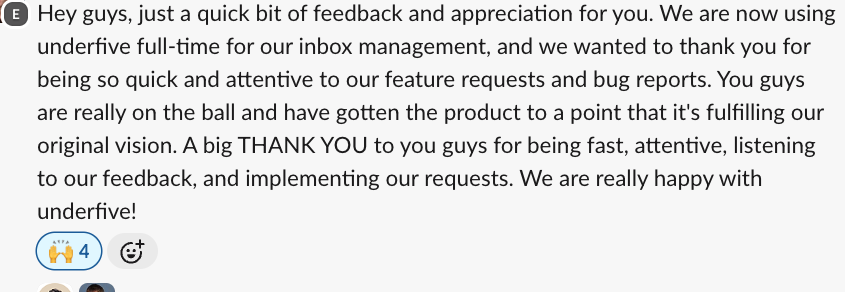
"You guys are really on the ball and have gotten the product to a point that it's fulfilling our original vision."
"Underfive has saved us a lot of time. It booked meetings directly in our clients' calendars, and our client was happy."
 Erik PaulsonFounder, Vendisys · on Email Bison
 "Underfive has exceeded my expectations! I use SmartLead and the quality of replies that Underfive generates, combined with the inbox agent configuration, is exactly what I was looking for."
 Suprava SabatFounder, AcquisitionX · on Smartlead
 Reply infrastructure is the layer that handles everything after a prospect replies to outbound. It pulls replies from every sending tool and client account into one inbox, sorts each one, answers in your voice from the original sender, follows up on quiet threads, books the meeting and logs the outcome, run by AI agents, your team or a managed desk.
A unified inbox is one part: it gathers replies. Reply infrastructure also answers, follows up, books and syncs, across every tool and client.
No. Keep your sequencer. Underfive connects with an API key and handles everything after the reply.
Yes. HeyReach, Expandi, Aimfox and GetSales.io replies land in the same inbox and are answered from the same profile.
Run it in-house when your team knows the offer and can review the replies that need a person. Use a managed desk when you want someone else working the Unified Inbox. Reply volume, the number of clients, and whether you need coverage outside your team's hours decide it. See who runs it for the split. Coverage hours, a response-time commitment, and price for the managed desk are not published on this page.
Measure reply SLA by reply type, cost per booked meeting, positive reply rate, reply-to-meeting rate, and coverage: replies answered against replies received.
Running this for clients? See the agency workspace model or book a demo.