
Cold email gets the hard part done for you. Someone who had never heard your name read your message, found it relevant, and wrote back. That is a minor miracle. What happens next is entirely up to you, and most sales teams fumble it by waiting too long.
Response time is not a courtesy metric. It is a conversion variable. This guide breaks down exactly what happens at each response time tier, why the numbers matter, and how to build a workflow that keeps you in the fast lane without burning out your team.
Why Response Time Matters More in Cold Email Than Inbound
With inbound leads, a prospect has already done research. They came to you. Their intent is warmer, their patience slightly longer.
Cold email is different. When a cold prospect replies, they are in a fleeting window of curiosity. They replied while your message was top of mind, likely within minutes of receiving it. Every hour that passes lets that curiosity cool. Competing priorities fill the space. By the time you reply two days later, they may not even remember what they agreed to.
The psychological principle at work is recency salience. The thing most recently in someone’s attention carries the most weight. Your reply lands best when their brain is still in the context of your original message.
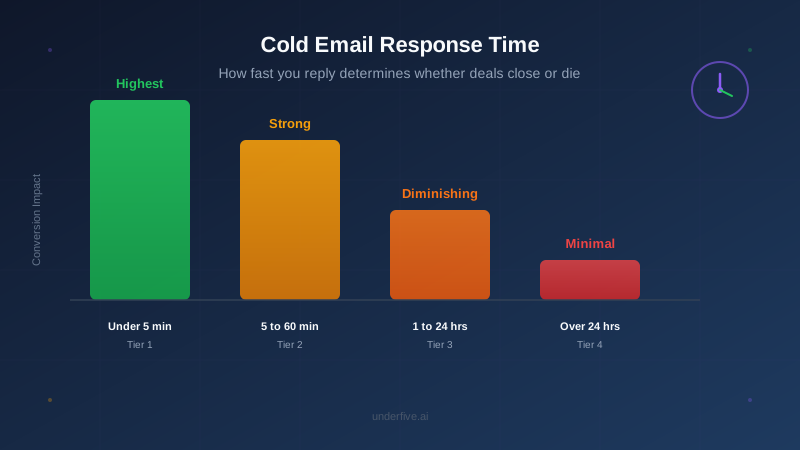
The Four Response Time Tiers
Not all delays are equal. Here is how to think about each window and what it signals to the prospect.
Tier 1: Under 5 Minutes
This is the gold standard. A reply within five minutes tells the prospect you are organized, attentive, and ready to do business. It feels like a real conversation rather than a processed ticket.
The conversion impact at this tier is significant. We have covered how 5-minute response times increase conversions in depth, and the core finding holds: speed signals seriousness. Prospects at this tier rarely go cold before the next exchange.
Five-minute replies are not realistic if a human is monitoring every inbox. This is where automation becomes a strategic asset rather than a convenience. Underfive’s AI reply agent is built specifically to close this gap, reading incoming replies and sending contextually accurate responses instantly, any time of day.
Tier 2: 5 to 60 Minutes
Still strong. Within the first hour, the prospect is likely still at their desk or still in the same mental context. A reply in this window feels prompt and professional. Most prospects will not notice the difference between five minutes and forty-five minutes.
The risk here is human inconsistency. Your SDR might catch the reply in twenty minutes if it lands during their morning block. It might sit for fifty-five minutes if it lands mid-meeting. That variance accumulates over hundreds of touches per week.
Teams that operate primarily in this tier are doing well. The ceiling is whether you can push more replies into Tier 1 without adding headcount.
Tier 3: 1 to 24 Hours
This is where most sales teams operate, and it is where deals quietly die.
A reply in this window is not catastrophically late, but it has costs. The prospect has moved on to other tasks. Your message is buried in their inbox. When your reply arrives, they need to re-read the original thread to remember what they even asked. That friction, small as it seems, reduces the chance they reply again.
We wrote a detailed breakdown of what happens when you wait 24 hours to reply to a cold email lead. The short version: engagement rates drop, follow-up rates drop, and the prospect’s perception of your team’s responsiveness is set at “slow.” That perception persists into the sales relationship.
If your team consistently falls in this tier, you do not have a motivation problem. You have a workflow problem.
Tier 4: Over 24 Hours
Anything beyond 24 hours is a missed opportunity. The prospect has mentally filed your exchange under “maybe later,” which in sales almost always means never. They may have already talked to a competitor who replied faster.
The exception is if the reply comes in outside business hours and is addressed first thing the next morning. That is still over 12 hours, but it is the minimum acceptable standard for teams without after-hours coverage. Even then, an automated acknowledgment sent immediately, with a personal reply to follow, is better than silence.
What Slows Teams Down
Before fixing response time, you need to know what is causing the delay. The usual culprits:
Inbox volume. When one SDR is managing five to ten active sequences simultaneously, incoming replies can stack up faster than they can be processed. The reply that came in at 9:47am gets seen at 11:15am after a standup, two internal Slack threads, and a prospecting block.
Triage overhead. Not every reply is the same. A “let’s connect” reply needs a different response than a “remove me” or a “forward to my colleague.” If SDRs have to read, classify, and craft a reply from scratch for every message, response time suffers.
Timezone gaps. If your SDRs are based in the US and a prospect in London replies at 8am GMT, that reply might sit for six hours before anyone is at a desk.
No clear ownership. In teams with shared inboxes or multiple SDRs per sequence, it is easy for a reply to fall through the cracks because each person assumed someone else handled it.
How to Operationalize Fast Replies
Step 1: Classify Before You Reply
The first step to replying fast is not typing faster. It is knowing what kind of reply you are dealing with before you open the compose window. Most cold email replies fall into a small number of categories: positive interest, request for more information, objection, referral, or removal request. If your team is not working from a consistent classification system, they are reinventing the wheel on every reply.
Underfive’s platform auto-classifies incoming replies so SDRs can prioritize their queue instead of sorting it.
Step 2: Use Templates for the High-Volume Cases
Seventy percent of positive replies say roughly the same things: “Sure, let’s find a time,” “Can you send more info?” or “Who would I talk to about pricing?” Templated responses for each of these, reviewed by a human before sending, cut reply time dramatically without sacrificing personalization.
The remaining thirty percent, the nuanced objections or detailed questions, deserve more attention. Letting automation handle the common cases frees your SDRs to spend real time on the complex ones.
Step 3: Automate After-Hours Coverage
Your prospects do not stop replying at 5pm. If you have no system for handling evening and weekend replies, you are leaving a large window of your pipeline unattended.
An AI reply agent covers this gap without requiring someone to be on-call. Replies that come in overnight are handled instantly and handed to a human in the morning only if escalation is needed. See Underfive’s integrations page for how this connects with your existing email tools.
Step 4: Set Internal SLAs and Measure Them
Teams that improve response time treat it like any other performance metric. Set a target, measure against it weekly, and make it visible. A simple report showing average reply time by SDR, by sequence, and by time of day gives you the data to identify exactly where the delays happen.
Step 5: Audit Your Sequence Timing
Response time is partly a function of when you send initial emails. If your sequences are launching at 4pm on a Friday, replies that come in Saturday morning sit until Monday. Small adjustments to send timing can meaningfully shift when replies land relative to your team’s availability.
A Note on Quality vs. Speed
The fear some teams have is that going faster means sending worse replies. This is a false tradeoff if you plan for it. Speed and quality are in tension only when your team is making up responses from scratch under time pressure.
With a classification system, a template library, and automation handling the routine cases, your team is not choosing between fast and thoughtful. They are sending accurate replies instantly for the majority of messages and spending more time on the replies that actually need it.
The goal is not to rush. The goal is to remove the friction that makes fast replies feel rushed.
Quick Reference: Response Time Targets
| Tier | Window | Conversion Impact | Team Action |
|---|---|---|---|
| 1 | Under 5 min | Highest | AI automation or dedicated inbox monitor |
| 2 | 5 to 60 min | Strong | Structured reply blocks, inbox triage |
| 3 | 1 to 24 hrs | Diminishing | Process fix needed |
| 4 | Over 24 hrs | Minimal | Prospect likely cold |
The Bottom Line
Cold email response time is one of the highest-leverage variables in your outbound motion. The prospect already said yes to a conversation. How quickly you pick up from there determines whether that yes turns into a meeting.
Build the systems that keep you in Tier 1 and Tier 2. Automate the coverage gaps. Measure what you manage. And if you want a tool that handles the reply layer without adding headcount, Underfive is built exactly for that.