
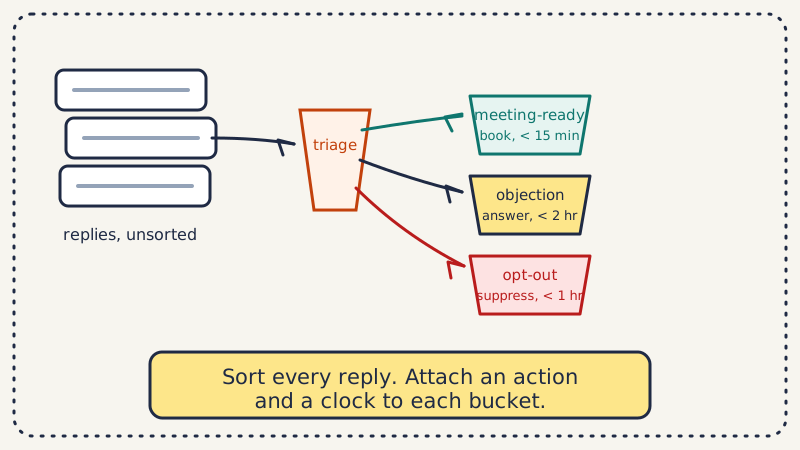
You cannot answer a reply well until you know what kind of reply it is. Most outbound teams skip that step, read each message top to bottom, and respond in the order things arrived, which means a “can you do Thursday at 2” sits in the same queue as an out-of-office bounce. The fix is not working the inbox harder. It is sorting every reply into a fixed set of cold email reply categories the moment it lands, then attaching one action and one deadline to each category.
This guide gives you the taxonomy we see work in practice: seven buckets, the tell that puts a reply in each one, the right first move, and how fast that move has to happen. Copy it, adapt the labels to your motion, and you will stop losing meetings to your own queue.
Why category comes before response
Reply handling has two jobs that people collapse into one. The first is classification: deciding what the prospect actually wants. The second is response: writing the message. When you do them together, you make the classification decision implicitly, under time pressure, one reply at a time, and you get it wrong on the ambiguous ones, which are exactly the ones that matter.
Separating the two steps buys you three things. You can prioritize, because a category carries urgency that raw arrival order does not. You can route, because a referral goes to a different play than an objection. And you can measure, because once replies are labeled you can see which categories convert, which objections repeat, and where responses are too slow. If you want the deeper version of the prioritization argument, we made it in scoring replies by buying intent.
The seven cold email reply categories
Fewer buckets than this and you lump distinct intents together. More and the boundaries blur and nobody labels consistently. Seven is the number that stays legible while still separating the replies that need different plays.
| Category | The tell | First action | SLA |
|---|---|---|---|
| Meeting-ready | Asks for a time, a link, or a call | Send booking link, propose two slots | Under 15 min |
| Info request | Wants a deck, pricing, case study, or details | Send the specific asset, ask one qualifying question | Under 1 hour |
| Objection | Engages but pushes back (budget, timing, incumbent) | Answer the objection, keep the thread open | Under 2 hours |
| Referral | Points you to someone else | Thank, ask for a warm intro, contact the named person | Same day |
| Not now | Interested later, “circle back in Q4” | Confirm the date, set a task, stop the sequence | Same day |
| Not interested | Clear pass, no future window | Acknowledge, close politely, do not argue | Same day |
| Opt-out | Unsubscribe, “remove me,” or hostile | Suppress immediately, confirm removal | Under 1 hour |
A few boundaries worth calling out, because they are where labeling goes wrong.
Meeting-ready is not info request. “Send me your deck” is not “let us talk.” The first is a stall you convert by attaching a light qualifier to the asset; the second is a buying signal you convert by getting time on the calendar. Treating a deck request as a booking loses the thread, and treating a booking request as a deck send delays the only reply that is time-critical.
Objection is not not-interested. An objection is engagement. The prospect wrote back with a reason, which means they are still in the conversation and the reason is your opening. “We already use a competitor” is an objection, not a close. If you are collapsing these two, you are killing live deals. We break the objection plays down in handling objection replies with AI.
Not now is not not-interested either. “Circle back in Q4” is a dated future opportunity, and the entire value is in capturing the date and actually returning on it. Filed as “not interested,” it evaporates.
Attach an action and a clock to every bucket
A category is only useful if it triggers something. The SLA column above is the part teams skip, and it is the part that determines whether a good reply converts. Speed-to-lead data has been consistent for years: the odds of qualifying a lead drop sharply after the first hour, and a prospect who asks for a time and waits until tomorrow has already downgraded you before the call.
So set the clock by category, not by a blanket “respond fast” rule. Meeting-ready and opt-out are the two that cannot wait, for opposite reasons: one is your best lead, the other is a compliance and deliverability risk you want out of your list immediately. Objections can take a little longer because they benefit from a considered answer. Not-interested can wait the longest because the move is simply a clean acknowledgment.
Routing matters as much as timing. A referral should leave the original thread and start a new one with the named person, or the intro never happens. An opt-out should hit your suppression list before anything else, because a second email to someone who asked to be removed is the fastest way to earn a spam complaint. Handle removals the careful way, as we describe in compliant unsubscribe handling.
Where classification breaks, and what to do about it
The taxonomy is easy on paper and hard at volume. Three failure modes show up once real replies hit it.
Mixed-intent replies. “Thanks, not the right time, but you should talk to Dana in ops.” That is not-now plus referral in one message. Rule: label by the highest-value actionable intent, then handle the secondary one in the same response. Here it is a referral (chase Dana today) with a not-now note on the original contact.
Ambiguity. “Interesting, tell me more” could be a genuine info request or a polite brush-off. When a reply is genuinely ambiguous, treat it as the higher-intent option and let the next message disambiguate. The cost of treating a warm lead as lukewarm is higher than the reverse.
Volume. One SDR reading and labeling every reply by hand does not scale, and the labeling gets worse exactly when a campaign is working and replies spike. This is where classification moves from a human habit to a system rule. Modern reply handling assigns a category and a confidence score to each message, auto-handles the clear cases like meeting-ready booking or opt-out suppression, and escalates the low-confidence and high-stakes ones to a human. The point is not to remove people from the loop. It is to spend their attention on the replies where judgment actually changes the outcome, which is the logic behind good human escalation rules.
Make the taxonomy earn its keep
The categories are also a reporting schema. Once every reply is labeled, you can answer questions that raw inbox volume hides. Which category converts to meetings most often, so you know where to spend response effort. Which objection repeats, so you can fix the messaging upstream instead of re-answering it forever. Whether your SLAs are actually being met, or whether meeting-ready replies quietly slip past fifteen minutes on busy days. A label you never analyze is just a folder. A label you review weekly is a feedback loop on your entire outbound motion.
Start simple. Take your last hundred replies, sort them into these seven buckets, and write down the first action and the deadline for each. You will find one or two categories where you have no repeatable play, and that gap is your highest-leverage fix. When the manual version proves the workflow and the volume outgrows it, an AI reply agent can run the same taxonomy at speed, classifying, routing, and responding within the SLAs while escalating the judgment calls. The taxonomy is the strategy either way. See how Underfive automates it once you have the buckets that fit your motion.