
How to Manage Cold Email Replies at Scale: A 5-Stage Workflow for Growing SDR Teams
Your outbound is working, which is exactly the problem. Replies are landing faster than your team can read them, good leads sit unanswered for hours, and nobody is certain which mailbox a given conversation even lives in.
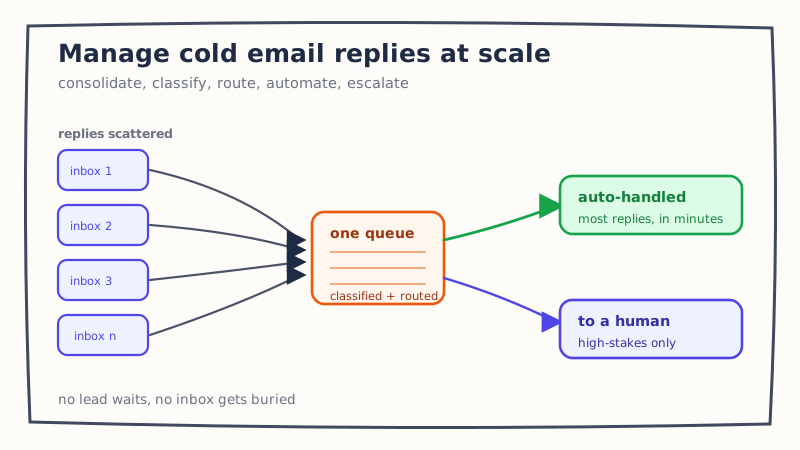
If you want to manage cold email replies at scale without hiring one SDR for every 200 mailboxes, you need a system, not a faster pair of hands. This guide lays out a 5-stage reply workflow that holds up whether you are fielding 40 replies a day or 4,000: consolidate, classify, route, automate, and escalate. Each stage removes a specific failure that quietly leaks revenue as volume climbs.
Why cold email inbox management breaks at scale
The root cause is structural. Cold email infrastructure is built to spread sending across many mailboxes and domains so you protect deliverability. That same design scatters the replies. Ten sending mailboxes means ten places a “yes” can hide, and the math only gets worse as you add inboxes to grow volume.
So the thing that makes outbound scale (more mailboxes) is the same thing that makes reply handling fall apart. Volume went up, but the reply process stayed manual: a rep tabs between inboxes, reads each message, guesses what it means, and decides what to do next. That works at low volume and collapses at high volume. We unpacked the underlying trend in why inbound reply volume is outpacing SDR capacity; this post is the operating system that closes the gap.
The goal of cold email inbox management is not to read every reply faster. It is to make sure each reply reaches the right owner, in the right state, within a time window that keeps the prospect warm. Here is how to build that.
Stage 1: Consolidate replies into one unified inbox
You cannot manage what you cannot see in one place. The first move is to pull replies from every sending mailbox into a single unified inbox for cold email, so your team works one queue instead of hunting across accounts.
Consolidation does three things at once. It kills the “which inbox was that in” problem. It lets you apply one consistent process to every reply regardless of which mailbox received it. And it gives you a single surface to measure, which you will need in Stage 5.
One infrastructure note worth keeping: reserve at least one mailbox per domain for warm reply threads and never use it for cold sending. Reply threads carry reputation, and you do not want a burning cold mailbox dragging down the conversations that are actually converting.
Stage 2: Classify every reply before anyone touches it
A consolidated inbox is still just a pile. The next stage is classification: every incoming reply gets tagged by type the moment it arrives, so a human never spends attention deciding “what is this” before deciding “what do I do.”
Most replies fall into a small set of buckets: interested, question or objection, referral to someone else, not now, wrong person, out of office, and unsubscribe. Each bucket has a clear action and a clear urgency. An “interested” reply needs a response in minutes; an out-of-office can be snoozed to the return date. We mapped each category to its action and SLA in our cold email reply triage workflow, and that taxonomy is the backbone of this stage.
Classifying first is what turns a chaotic inbox into a prioritized work queue. Instead of handling replies in the arbitrary order they arrived, your team handles the revenue-positive ones first and lets the low-stakes ones wait.
Stage 3: Route each reply to the right owner
At scale, classification is not enough, because a tagged reply with no owner still goes stale. Reply routing assigns every conversation to a specific person or automated step so nothing sits in a shared inbox that is technically everyone’s job and therefore no one’s.
Two routing rules cover most teams:
- Ownership first. If the contact or account has talked to someone on your team before, route the reply back to that rep. A cold lead feels warm when the person replying already knows the context, and you avoid the awkward “let me catch up on your file” opener.
- Round robin for the rest. For genuinely new replies with no prior owner, distribute them evenly across available reps in rotation so no one gets buried and no lead waits behind a backlog. We compared this approach to manual assignment in AI reply routing vs round-robin SDR routing.
Good routing also respects time zones and working hours. A reply that lands at 2 a.m. in the rep’s region should either route to a rep who is awake or get an automated acknowledgment, not wait eight hours for someone to log in.
Stage 4: Automate the low-risk replies
Once replies are classified and routable, a large share of them do not need a human at all. This is where an AI reply agent earns its place in the SDR reply workflow: it drafts and sends responses to the predictable, low-risk categories so your reps only spend attention where judgment actually matters.
Think about what a rep does with a “can you send more info” reply or a “what does this cost” question. The answer is nearly the same every time, yet it still has to happen within minutes to keep momentum. Those are exactly the replies to automate. An AI agent can acknowledge an out-of-office and re-queue the follow-up for the return date, answer a common pricing question with a qualifying question of its own, or propose two meeting times to an interested prospect, all without a rep opening the thread. Tools like Underfive are built specifically to read a cold reply, understand intent, and respond in your brand voice around the clock, which is the only realistic way to hold a fast response time across thousands of conversations.
The point of automation is not to remove humans. It is to spend human attention on the 20 percent of replies where it changes the outcome, and to stop spending it on the 80 percent where it does not.
Stage 5: Escalate the high-stakes replies to a human
The flip side of automation is knowing exactly when to hand off. A reply management system that tries to automate everything will eventually send a tone-deaf response to your biggest prospect, and that single miss costs more than the time it saved.
Set explicit escalation rules so high-stakes replies jump straight to a human: a named enterprise account, a pricing negotiation, an angry or sensitive message, a legal or security question, or anything the agent is not confident it understood. Everything above that bar gets a person; everything below it gets handled automatically. We detail how to draw that line in our guide to AI reply agent human escalation rules. A clean escalation path is what lets you automate aggressively without gambling your best deals, and it is a core reason the Underfive approach to reply handling keeps a human in the loop by design.
A worked example: managing cold email replies at scale
Picture a team running 150 mailboxes and fielding roughly 900 replies a day. Without a system, those replies sit in 150 places and reps chase them by gut feel, so response times drift into hours and interested leads cool off.
With the 5-stage workflow, the same day looks different. Every reply lands in one queue (consolidate), gets tagged by type on arrival (classify), and is assigned to a prior owner or round-robined to an available rep (route). The agent immediately handles the out-of-office, send-more-info, and simple pricing replies (automate), while the three enterprise accounts and one billing complaint are flagged and pushed to a senior rep within minutes (escalate). The reps never touched 600 of the 900 replies, and the 300 that mattered got faster, better responses.
Measure the system, then tighten it
A workflow you do not measure will quietly decay. Track a small set of numbers that tell you whether each stage is holding: median time to first response, percent of replies auto-handled without escalation, percent of interested replies answered inside your SLA, and meetings booked per 100 replies. If time to first response climbs, your routing or automation is the bottleneck. If auto-handled replies fall, your classification rules need tuning.
These are the same operating metrics that separate a team that merely sends a lot from a team that converts what comes back. The workflow is what makes them move.
Where to start
You do not have to build all five stages at once. Start with consolidation and classification, because a single prioritized queue delivers most of the early relief. Add routing when more than one person is handling replies, then layer in automation and escalation as volume grows past what your team can read in a morning.
If you are already past that point, where replies outnumber the hours your reps have to answer them, that is the signal to put automation and escalation in place now rather than hiring your way out of a structural problem. See how an AI reply agent slots into the workflow at underfive.ai, and map your current reply volume against the five stages to find the one that is leaking the most.