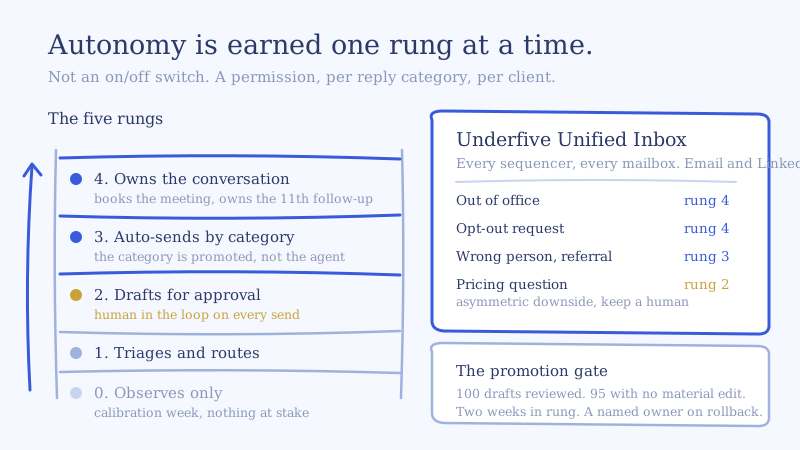
AI Inbox Agent Autonomy Levels: A 5-Rung Ladder for When AI Sends Replies Unsupervised
You have the agent configured, you have read the first few hundred drafts, and they are good. Now someone has to decide whether the agent gets to send without a human looking first, across 180 mailboxes belonging to a client who is not your brand to risk. Almost every team treats that as a single on/off switch, which is exactly why AI inbox agent autonomy levels get either flipped all at once and rolled back after one bad thread, or never flipped at all.
The on/off framing is the mistake. Autonomy is not a global setting, it is a per-category, per-client permission that gets earned one rung at a time. The published advice on when to let AI send replies automatically is almost entirely written for customer support, where the recipient opted in, there is a knowledge base of correct answers, and the worst case is an annoyed existing customer. Cold outbound has none of those properties. The recipient is a stranger, the correct answer is a judgment call, and the worst case lands on your client’s domain reputation and your renewal.
Here is the ladder we run, and the gates between the rungs.
What AI inbox agent autonomy levels actually mean
An autonomy level answers one question: what can the agent do to a live conversation without a human in the path? Not how smart the model is, not how good the copy is. What it is permitted to do unsupervised.
That matters because the two things are independent. A drafting quality of 95% is excellent for a rung where a human approves and terrible for a rung where nothing does. At 180 replies a day, a 5% miss rate is nine bad sends a day under your client’s sender identity. Autonomy is a risk allocation decision, and it should be reasoned about with the same discipline you would apply to giving a new hire send access to a client mailbox on day one.
The five rungs of agent autonomy
Rung 0: Observe
The agent reads every reply and writes nothing. It produces a classification and a would-be draft that only your team sees. Humans handle everything.
This rung looks useless and is not. It is how you build the calibration data set before you have anything at stake. You run it for the first week on a new client, read the classifications against the raw replies, and find out where the agent misreads that client’s specific buyer language. “We’re already running something internally” means a hard no in one market and an opening in another. You want that discovered at rung 0.
Rung 1: Triage and route
The agent classifies, prioritizes, and routes. It touches the queue, not the conversation. Positive replies surface at the top, opt-outs get flagged for suppression, wrong-person replies get tagged for rerouting, and sentiment ordering decides what an inbox manager sees first.
This is where most of the time savings actually live, and it is underrated because it is unglamorous. If your inbox managers are spending their first hour of the day deciding what to work rather than working it, rung 1 pays for the whole system before a single reply is auto-sent. The seven-category triage taxonomy is the thing you are implementing at this rung, and the categories you define here are the units that get promoted later.
Rung 2: Draft for approval
The agent writes the reply in the sender’s voice and holds it. A human reads it, edits or approves, and it goes out under the right identity. This is human in the loop AI email replies in the strict sense: every outbound message passes a person.
Rung 2 is the workhorse. It is also where the agency economics change, because approving a good draft takes roughly 20 seconds and writing a reply from scratch takes about four minutes once you include reading the thread and checking the client playbook. Underfive’s AI inbox agent sends a Slack or email notification for review before the reply goes out, which is the mechanism that makes this rung practical at volume instead of a tab somebody forgets to check.
Most agencies should plan to live at rung 2 for the majority of their reply volume indefinitely, and that is not a failure state. It is the correct ceiling for conversations where the downside is asymmetric.
Rung 3: Auto-send by category
Specific reply categories send without approval. Not the agent, the category. Out-of-office handling sends itself. Opt-out acknowledgments send themselves. Meeting time negotiation on an already-positive thread sends itself. Pricing objections still queue for a human.
This is the rung that the on/off framing destroys, because it is the only rung where the risk and the volume are matched correctly. The categories that are high-volume and low-judgment are exactly the categories that should go first, and they are a large share of a cold inbox.
Rung 4: Autonomous conversation ownership
The agent owns the thread end to end, including the follow-up eleven weeks later and the reschedule after a no-show. A human sees it only if an escalation rule fires. The agent negotiates a time and puts the meeting on the client’s calendar.
Rung 4 is appropriate for a narrow set of categories and almost never for a whole client. The honest version of this rung is not “the agent runs the inbox,” it is “the agent runs the mechanical conversations and a human runs the commercial ones,” which at real reply mix is still most of the thread count.
When to let AI send replies automatically: autonomy is per category
Autonomy granted at the agent level is the wrong unit. Granted at the category level, the decision becomes tractable because each category has a legible worst case.
| Reply category | Recommended ceiling | Why |
|---|---|---|
| Out of office, auto-reply | Rung 4 | No human reads the response. Worst case is a wasted send. |
| Opt-out, unsubscribe request | Rung 4 | The right action is mechanical and must be fast. A delay is the risk, not the send. |
| Wrong person, referral to someone else | Rung 3 | Low judgment, high volume. Verify the reroute logic, then let it run. |
| Not right now, circle back later | Rung 3 | A dated follow-up commitment is the whole reply. Easy to get right, costly to forget. |
| Interested, wants a time | Rung 3 after proving | Scheduling is mechanical. The first message after a yes is not, so prove the opener at rung 2 first. |
| Question about the offer | Rung 2 | Answer quality depends on the client playbook being right. Keep a human until the playbook is proven. |
| Pricing, procurement, contract terms | Rung 2 | Asymmetric downside. A wrong number is unrecoverable. |
| Objection, competitor incumbency | Rung 2 | Recoverable only if handled well. Reads as the highest-value human touch in the inbox. |
| Negative, complaint, hostile | Rung 1 | Route to a human immediately. Never auto-send into anger. |
| Legal, compliance, data request | Rung 1 | Route to the client, not your team. |
The pattern is consistent: autonomy tracks inversely with how much of the answer depends on commercial judgment about that specific account. That is also why the ceilings above are ceilings and not defaults. A category sitting at its ceiling should have earned it.
The promotion gate: how a category earns the next rung
An AI reply approval workflow that never promotes anything is just a slower inbox. The gate has to be specific enough that promotion is a measurement rather than a mood.
We use four conditions, and a category has to clear all four:
- Volume. At least 100 drafts reviewed in that category for that client. Below that you are reading noise.
- Approval without material edit. At least 95 of the last 100 approved with no edit that changed meaning, commitment, or tone. Fixing a comma is not a material edit. Changing a price, a date, or a claim is.
- Time in rung. At least two weeks, so the category has seen a full sending cycle rather than one unusually clean batch.
- Named owner. A human on your team who owns that category for that client and whose name is on the rollback decision.
Condition 2 is doing the real work, and the reason it is phrased as “material edit” rather than “approved” is that approval rates lie. An inbox manager under time pressure approves things. Edits are the honest signal, because an edit is someone deciding the draft was wrong enough to spend time on. Track edit rate per category or you are measuring your own impatience.
Promotion also runs one rung at a time, per category, per client. There is no path from rung 1 to rung 3.
Why autonomy has to be per client, not per workspace
This is where agency operations diverge from in-house, and where most tooling quietly fails. You are not deciding your own risk tolerance, you are deciding nine different clients’ risk tolerances, and they are not the same.
A client selling a $400/month product into SMB will happily let the agent handle pricing questions, because the price is on their website and the downside of quoting it is zero. A client selling a six-figure platform into regulated enterprise should never have an agent say a number. Same agent, same quality, opposite correct answer. If your autonomy settings are global, you are forced to run every client at the most conservative client’s ceiling, which means the SMB client pays for the enterprise client’s caution in slower replies.
Structural per-client separation is a prerequisite, not a nice-to-have. That is one of the ten criteria we laid out for evaluating a unified inbox for outbound, and autonomy configuration is the sharpest test of whether the separation is real: if you cannot set a different ceiling per client per category, the partitioning is cosmetic.
Two more things belong in the per-client config:
- The autonomy level the client agreed to, in writing, before launch. Agencies get burned here by assumption rather than by the agent. Put the ladder in the onboarding doc and have the client pick the ceiling per category. It takes one call and it ends the entire argument before it happens.
- Whose brand the sender identity carries. If replies go out under the client’s domain and their account executive’s name, the client sets the ceiling. Not you.
The rollback trigger
Define it before you promote, because defining it after a bad thread is how a program gets switched off entirely.
Rollback is one rung down for that one category for that one client, triggered by any of:
- Two material-edit-worthy sends inside a week that nobody caught in time
- Any send that made a commitment the client cannot honor, which is a single-strike trigger
- A client complaint about tone or content on an auto-sent reply
- Classification drift, meaning the category starts catching replies it was not built for, usually because the client changed their offer or their targeting
The important property is that rollback is narrow. One category, one client, one rung. An agency that responds to one bad pricing reply by moving everything back to rung 2 has just paid the full cost of the incident and thrown away all the compounding. Keep the blast radius the size of the actual failure.
Rollback and escalation are different mechanisms and both are required. Escalation routes a live conversation to a human in the moment. Rollback changes the standing permission. We covered the first in detail in the five escalation rules every reply agent needs, and the two together are what make rung 3 and rung 4 defensible rather than optimistic.
A worked example: ramping one client from rung 2 to rung 3
Take one client, 180 mailboxes, sending 25 a day per mailbox. That is 4,500 sends a day. At a 4% reply rate you are handling about 180 replies a day for this client alone.
Assume a reply mix that looks like a lot of cold inboxes we see: roughly 30% out of office and auto-replies, 10% opt-outs, 15% wrong person or referral, 20% not right now, 10% questions and objections, 10% interested, 5% negative or other. Those are the shares for this model, not a published benchmark, so run your own.
At rung 2, every one of those 180 replies needs a human to open it and approve. At roughly 20 seconds per approval that is a hair over an hour a day of pure approval time, plus the context switching, plus the 10% that get a real edit and take four minutes each. Call it two and a half hours a day for one client. Across nine clients an inbox manager is out of hours before lunch, and we have written separately about how many mailboxes one inbox manager can actually absorb.
Now promote the two cheapest categories. Out of office and opt-outs are 40% of volume and both sit at a rung 4 ceiling. Promote them and 72 replies a day stop needing a human at all. Promote wrong-person routing to rung 3 after it clears the gate and you remove another 27. You are down to about 81 replies a day needing approval, for the same reply quality, having touched none of the categories where judgment matters.
That is the point of the ladder. The volume reduction comes from the boring categories, which is exactly why a global on/off switch is such a bad trade: it asks you to take all the risk to get the savings, when 40% of the savings carry almost no risk at all.
Where to start
If you are on an all-or-nothing switch today, do not flip it. Pick your most forgiving client, define the categories, sit at rung 2 for two weeks, and track edit rate per category rather than approval rate. Then promote out-of-office and opt-outs, and nothing else, for another two weeks. The ladder works because each rung produces the evidence for the next one.
If you are running more clients than you can write playbooks and gates for, the managed reply desk for agencies exists for exactly that case: we run the ladder across your existing sequencers and LinkedIn tools, per client, with the per-category ceilings documented. Either way the sequencers keep sending. The only thing that changes is how much of the reply volume still needs a person in the path, and which parts of it should always have one.
If you want to see the approval path before you decide any of this, book a demo and we will walk the rungs against your actual reply mix.