PlusVibe Reply Management: Running the Unibox and AI Reply Agent at Agency Scale
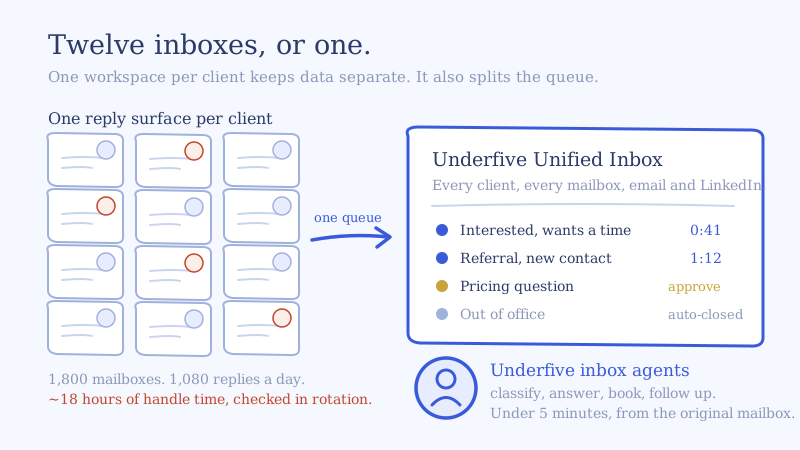
You run twelve clients on PlusVibe, roughly 1,800 mailboxes, one workspace per client because that is the correct way to keep client data separate. Sending is healthy. PlusVibe reply management is where the operation starts to cost you money, because your inbox managers are not working one Unibox. They are working twelve, and they are switching between them all day.
This is the playbook for the reply half. What the PlusVibe Unibox is genuinely built to do, exactly where the AI Reply Agent helps and which plan gates it, why the workspace boundary is the real ceiling on a multi-client reply desk, and how to wire a layer on top without ripping out anything you already run.
What the PlusVibe Unibox is built for, and where reply management stops
The PlusVibe Unibox collects replies from every inbox you have connected in a workspace and tags each one with the campaign it came from. It is a real unified inbox for cold email inside a single workspace, and the surrounding tooling is better than most people give it credit for:
- AI label detection reads the first reply from a prospect and assigns one of four default labels: Interested, Not Interested, Out of Office, or Automatic Reply. You can add custom labels and give each one a sentiment type of Positive, Negative, or Neutral, configured under Workspace Settings. Custom AI prompts to sharpen the categorization are a Business plan capability. (docs)
- An “Others” folder catches replies from an address not yet associated with a lead, so a reply that arrives from a colleague’s address does not vanish. You can search by email and attach it to the right lead.
- Replace Lead in Unibox swaps a lead’s email mid-campaign when someone leaves or refers you onward. The original contact drops out of the active campaign, the new one starts at step one, and the existing conversation history is preserved.
- Auto Follow-Up builds a follow-up sequence for leads who have not replied, configured at Unibox then AI Automation then Auto Follow-up, with a delay, message content per stage, and a cap on attempts. Business plan.
- Subsequences branch a lead into a new workflow based on their reply, triggered either by a lead label or by text contained in the reply, with a dedicated condition for “replied, excluding out of office and automatic replies.”
Those are the right primitives. The thing to be clear-eyed about is what they are primitives for. All of it is scoped to one workspace, and it is email. Labeling a reply is not the same as answering it, and that distinction is the entire job at scale.
The PlusVibe AI Reply Agent, and the plan gates that matter
PlusVibe’s AI Reply Agent responds to leads automatically based on conditions you define. Before you build an operation around it, know its actual shape:
Three sending modes. Draft Mode writes the reply and leaves it in Drafts for a human to review. Immediate sends as soon as the rule condition fires. Delayed sends after a wait you set in minutes or days.
Rules scope three ways. Each rule triggers on a specific label, applies to a campaign you choose, and sends from an email account you select. You can add CC recipients.
A Confidence Filter as the safety net. When the model’s confidence score is low, PlusVibe does not send. It saves the reply as a draft instead. That is a genuinely well-designed default, and it is the behavior you want on anything commercially sensitive.
Subsequent Replies is a separate toggle. By default the agent handles the opening reply. Enabling Subsequent Replies lets it carry an ongoing thread. PlusVibe’s own documentation recommends reserving this for labels like “More Information” or “Needs Qualification” and handling high-intent labels manually, and warns that models can generate inaccurate responses. Take that advice seriously. It is the correct instinct.
The plan gate. Per PlusVibe’s docs, the AI Reply Agent is available on Business plans only. The pricing page lists AI Reply Sentiment Detection on Personal at $37 per month, AI Reply Agents on Business at $77 per month, and Advanced AI Reply Agents on Agency at $497 per month. Webhooks and API access also sit at Business and above, which matters a lot for what comes next.
So if you are running twelve clients and you want automated replies plus webhook access on all of them, check carefully whether you are buying that per workspace or once. That arithmetic drives the rest of this decision.
Why the workspace boundary is the real ceiling
Here is the structural issue, and it is not a knock on PlusVibe. It is the consequence of doing client isolation properly.
A PlusVibe workspace separates “campaigns, email accounts, leads, block lists, and settings into different environments,” and PlusVibe explicitly recommends a separate workspace per client. The Global Block List is documented as per-workspace: a blocked domain is blocked “from all of your campaigns in the same workspace.” Every endpoint in PlusVibe’s API, including the Unibox endpoints, requires a workspace_id.
That is exactly right for data separation. It also means the unit of the Unibox is the client, not the agency. Twelve clients is twelve reply surfaces, each with its own labels, its own AI Reply Agent rules, and its own block list. Nothing in PlusVibe’s documentation describes a cross-workspace inbox, and nothing describes one not existing either, so verify the behavior in-app for your plan before you design around it. But the API shape and the block list scoping both point the same direction.
Three consequences follow, and they are the ones that actually hurt:
- No single queue. An inbox manager cannot open one screen and see the oldest unanswered positive reply across all twelve clients. They check workspaces in rotation, which means response time is set by rotation order, not by urgency.
- Rules multiply by client. Label taxonomies, AI Reply Agent rules, auto follow-ups, and block lists get configured twelve times and drift apart. Client 4 gets a reply treatment client 9 never got, and nobody notices for a month.
- It is email. We found no LinkedIn handling in the Unibox. If you run HeyReach, Expandi, Aimfox or GetSales alongside PlusVibe, those replies live somewhere else entirely, and the same human on two channels is two conversations with no shared context. We wrote the full version of that problem in the unified inbox for LinkedIn and email playbook.
Add the common agency reality that PlusVibe is not your only sequencer. One client came with Smartlead, another with Email Bison, and now PlusVibe’s excellent per-workspace Unibox is one of fifteen reply surfaces.
The reply math on twelve PlusVibe workspaces and 1,800 mailboxes
Run the arithmetic before you decide anything. Substitute your own numbers, the method is what matters.
Start with the inputs: 12 clients, 150 mailboxes each, 1,800 mailboxes total, a conservative 15 sends per mailbox per day. That is 27,000 emails a day.
At a 4 percent raw reply rate, every reply of every kind included, that is about 1,080 replies a day.
Now split them the way PlusVibe’s four default labels will:
- Out of Office plus Automatic Reply absorb a large share of raw cold email volume. Call it 45 percent, so roughly 485 replies need no human thought at all.
- That leaves about 595 human replies a day.
- Of those, Interested at 20 percent is roughly 120 replies that are worth real money.
- Not Interested at 65 percent is about 385 replies that still need a decision: unsubscribe, block list, or nurture later.
- The remaining 90 or so are ambiguous, multi-stakeholder, or simply did not fit a label.
Then price the handle time. A considered reply to an Interested lead, including a look at the campaign context and the client’s offer, runs four to six minutes. Call it five.
- 120 Interested at 5 minutes = 10 hours
- 385 Not Interested at 30 seconds = 3.2 hours
- 90 ambiguous at 3 minutes = 4.5 hours
That is roughly 18 hours of handle time a day, before anyone opens a second workspace. Across a nine-hour working window, 1,080 replies arrive at about two per minute. Two full-time inbox managers cannot hold a five-minute response SLA against that arrival rate, and the twelve-workspace rotation makes it worse, because the clock on a hot reply starts when it lands, not when someone gets to that client’s tab. We broke down where the human ceiling actually sits in how many mailboxes one inbox manager can really handle.
This is why “hire another inbox manager” stops working. The constraint is not hours. It is latency.
Wiring PlusVibe reply management into a unified inbox for cold email
The fix is not to replace PlusVibe. PlusVibe sends, and it sends well. The fix is to put one conversation layer on top of every workspace and every other tool in the stack, so there is a single queue and a single set of rules. Here is the sequence.
Step 1: Connect each workspace as its own client space
Generate an API key per workspace as a Workspace Admin, and connect each one to Underfive as a separate client space. Client isolation survives, because the separation is preserved on our side too. What changes is that your team gets one queue across all twelve, sorted by how hot and how old a reply is rather than by which tab they happened to open. See the PlusVibe integration for the current setup path.
Step 2: Keep PlusVibe’s labels, add the routing layer above them
Do not rebuild what already works. PlusVibe’s four AI labels plus your custom ones are good triage, and they carry through. Layer the decisions PlusVibe’s labels cannot express: which client’s playbook applies, which human owns an escalation, what the SLA is for this specific account, and what happens on the LinkedIn side of the same prospect.
Step 3: Subscribe to the right webhook events
PlusVibe’s webhooks fire on “All Email Replies” and on label changes, including Lead marked as Interested, Meeting Booked, Meeting Completed, Wrong Person, and Closed. Subscribe to All Email Replies, not just the label events. Label events tell you what PlusVibe concluded. The raw reply event is what lets the layer above form its own view, including on the replies PlusVibe left uncategorized. The payload carries thread_id, camp_id, lead_id, workspace_id and actual_replied_from, which is everything needed to reconstruct the conversation and answer from the right identity.
Step 4: Decide auto-send versus approval by label, not globally
This is the decision that determines whether the whole thing works. Set it per category:
| Reply category | Who answers | Why |
|---|---|---|
| Out of Office, Automatic Reply | Agent, auto-send | Nothing to get wrong. Reschedule the touch and move on. |
| Not Interested | Agent, auto-send | Acknowledge, suppress, add to the block list. A human adds nothing. |
| Interested, wants a time | Agent, auto-send | Speed is the entire value. Offer times and book. |
| Not right now, circle back | Agent, auto-send | Confirm the date, set the follow-up, close the loop. |
| Referral or wrong person | Agent, auto-send | Thank, ask for the handoff, route to the new contact. |
| Pricing and commercial terms | Human approves | Client-specific and easy to get wrong in writing. |
| Security, legal, compliance | Human approves | Never let a model freelance here. |
| Novel objection, uncategorized | Human approves | If it did not fit a label, it needs judgment. |
Five of eight close without a human. The ~120 Interested replies and the long tail of easy categories stop queuing, and your inbox managers spend their day on the few dozen conversations where judgment actually changes the outcome. Our AI inbox agents run this split by default, and they hold the same under-five-minute target whether the reply arrives at 10am or 2am.
Step 5: Reply from the original sending mailbox
Non-negotiable. The answer has to leave from the mailbox that sent the original message, in that thread. Replying from a central address breaks the thread for the prospect and breaks the sending reputation you spent weeks warming. PlusVibe’s webhook payload includes actual_replied_from, so the correct identity is available on every event. Use it.
Step 6: Book on the calendar, do not just promise to
A reply that ends in “what times work for you?” is a reply that will need two more touches. Wire the calendar directly so a positive reply ends in a held slot. PlusVibe has a Calendly integration, and the conversation layer should be connecting to the same calendar so there is one source of availability rather than two.
Step 7: Sync the outcome, not the transcript
PlusVibe has native HubSpot and GoHighLevel integrations that sync replies and create deals when a label is applied. Keep them. Decide once, per client, whether the CRM record is written by PlusVibe or by the conversation layer, and do not let both write. Double-written deals are a worse problem than no deals.
Where PlusVibe’s native reply tools are the right answer
Be honest about this, because it determines whether you need a layer at all.
If you run one client inside one workspace, PlusVibe’s own stack is sufficient and adding anything on top is overhead. The Unibox aggregates, the four AI labels triage, the AI Reply Agent on Business handles the easy categories with the Confidence Filter protecting you, and Subsequences branch the rest.
PlusVibe’s white label client access is also genuinely strong for agencies and worth using regardless. You can give a client a branded login, and the access levels include Unibox-only access with the option to hide specific reply labels, which is exactly the right control. There is a white label client app that gives clients a branded mobile inbox with push notifications on new replies and on prepared AI drafts. Note that the plan tier for white labeling reads inconsistently across PlusVibe’s pricing page and help docs, so confirm it for your account rather than assuming.
The layer earns its place at a specific threshold: more than one workspace, more than one sequencer, or more than one channel. Below that, you do not need it. Above it, the per-workspace design that makes PlusVibe correct for client isolation is the same thing that makes a single queue impossible without help.
The four numbers a PlusVibe reply desk runs on
Stop reporting replies received. Report these:
- Median time to first response, per client. Not the average, which one overnight reply ruins. The median is what your clients actually experience. Target under five minutes, measured from reply arrival, not from workspace open.
- Percentage of replies closed without a human. If this is below 60 percent you are paying people to send acknowledgements. If it is above 90 percent, check that nothing commercially sensitive is being auto-sent.
- Reply-to-meeting rate, per client. Positive replies divided into meetings actually held. This is the number a client renews on, and it is the one that moves most when response latency drops.
- Uncategorized reply volume. Replies that fit no label are where revenue hides. If this climbs, your label taxonomy has drifted in one workspace and nobody noticed.
Set the SLA explicitly before you tune anything else. We laid out how to define and enforce one in the cold email reply SLA guide.
Self-serve or managed
If you have the inbox managers and just need the single queue and the agents, connect your PlusVibe workspaces and run it yourself. Start with your highest-volume client, measure median first response for two weeks against your current rotation, then roll the rest in.
If you are short the headcount, which is the more common situation at twelve clients and 1,800 mailboxes, we also run the reply desk as a managed service: our team plus our agents working your clients’ replies against an agreed SLA. See Underfive for agencies, or book a demo and bring one client’s reply volume with you. We will do the arithmetic above on your real numbers and show you where the hours are going.
If you want the category-level version of this argument rather than the PlusVibe-specific one, start with what a unified inbox for cold email actually is and how to evaluate one.