
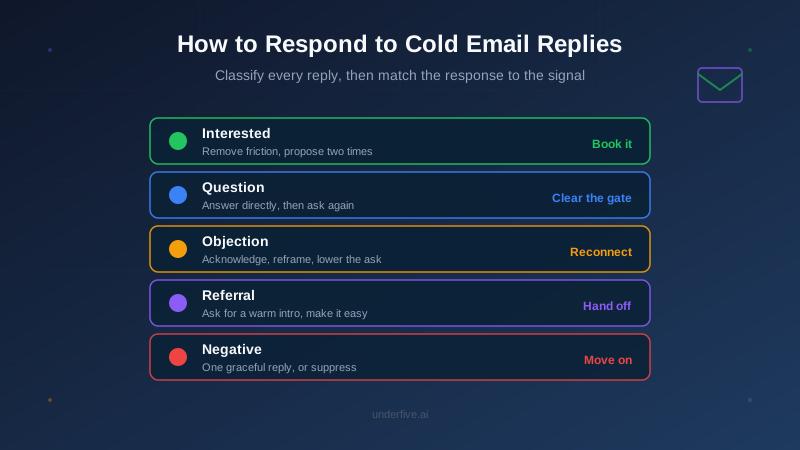
You sent 300 cold emails, and 18 people wrote back. Now what you type next decides whether those 18 turn into calls or dead threads. Most reps treat every reply the same way, a fast “Great, when are you free?” that works for the eager prospect and quietly kills the skeptical one. Knowing how to respond to cold email replies means reading what each person is actually telling you and matching your answer to it.
A reply is not a yes. It is a signal, and different signals need different moves. This guide breaks replies into five types you will see over and over, gives you the response logic for each, and shows where a template helps and where it hurts.
Read the Reply Before You Write Back
The single biggest mistake in reply handling is answering the reply you hoped for instead of the one you got. Before you type a word, spend ten seconds sorting the message into a category. Ask three questions:
- What are they asking for? A meeting, information, a price, or an exit.
- What is their temperature? Curious, cautious, annoyed, or done.
- What is the smallest next step they would say yes to right now?
That last question matters most. A prospect who replies “interesting, what does it cost?” is not ready to book 45 minutes. They are ready to hear a number and a reason to keep talking. Push too hard and you lose the momentum you just earned. If you handle a high volume of responses, a repeatable reply triage workflow keeps this sorting consistent across your whole inbox instead of leaving it to gut feel.
The Five Reply Types and How to Respond to Each
1. The Interested Reply (“Tell me more” / “Sounds good”)
This is the one you wanted. The prospect is warm and the only job now is to remove friction between them and a conversation. Do not send a paragraph. Send a specific, easy yes.
The mistake here is open-ended scheduling. “Let me know what works” hands the prospect a small chore, and small chores get deferred. Instead, propose two concrete times and a booking link as a fallback.
Happy to walk you through it. Does Thursday at 11 or Friday at 2 (ET) work? If neither fits, grab any slot here: [link].
Speed compounds this. An interested reply cools fast, so getting your answer out inside the first hour is worth more than getting the wording perfect. We cover the numbers behind that in cold email response time best practices.
2. The Question Reply (“How does it work with X?”)
The prospect is interested but has a gate to clear first. They need one specific piece of information before they will commit time. Answer the question directly and briefly, then reach for the meeting again, not before.
The failure mode is dodging the question to force a call. “Great question, let’s hop on a quick call and I’ll explain” reads as evasive, especially to technical buyers. Answer it, prove you understood it, and let the answer earn the next step.
Good question. It plugs into your existing sending tool over API, so nothing changes about how you send. It only steps in once a reply lands. Want me to show you the setup live? Takes about 15 minutes.
3. The Objection Reply (“Not right now” / “We already use something”)
This is the reply most reps fumble, because it feels like a no and they either give up or argue. It is neither. It is a request for a reason to reconsider. Acknowledge the objection honestly, add one piece of information that reframes it, and lower the ask.
Do not counter every objection with a pitch. “Not right now” often means bad timing, not disinterest, so the right move is to make it easy to reconnect later rather than to win the argument today. For a deeper breakdown of the specific language that works, see our guide on handling objection replies in cold email.
Totally fair, timing is everything with this. Most teams we work with switched not because their current setup was broken but because reply handling was still eating an hour a day. If it’s useful, I can send a two-minute overview you can revisit next quarter. No pressure either way.
4. The Referral Reply (“You want to talk to someone else”)
The person you emailed is telling you they are not the buyer, but they are handing you a path to the buyer. This is a gift, and the response is about making the handoff effortless while keeping the original contact on your side.
Thank them, ask for a warm introduction rather than just a name, and give them a one-line forwardable blurb so saying yes costs them almost nothing.
Really appreciate you pointing me the right way. Would you be open to a quick intro to Dana? Happy to make it easy, here’s a line you can forward: “This team handles cold email replies automatically so reps stop losing warm leads to slow follow-up, might be worth 15 minutes.”
5. The Negative Reply (“Not interested” / “Remove me”)
Some replies are a clear stop. A blunt “not interested” gets one graceful, low-effort reply at most. A “remove me” or “unsubscribe” gets no pitch at all, only a fast, respectful confirmation and immediate suppression, because continuing to email them is both bad manners and a compliance risk.
Reading the difference matters. “Not interested” leaves a small door open for a single classy reply. “Take me off your list” closes it entirely, and the only correct response is to honor it and move on.
Speed Is Part of the Response
The best-written reply sent a day late still loses to a decent reply sent in ten minutes. When someone writes back to a cold email, you have their attention for a short window, and every hour that passes lets a competitor, a meeting, or their own inbox pull them away. Fast beats polished more often than reps want to admit.
This is the hard part of reply handling at scale. One rep watching one inbox can be fast. A team running thousands of sends across time zones cannot manually hit every reply inside the window, which is exactly where warm leads leak out of the pipeline.
When to Stop Writing Replies by Hand
Templates make individual replies faster, but they do not solve the coverage problem. Replies arrive at 2 a.m., during your team’s off day, and in the ninety minutes your best rep spent on a demo. That is where an AI reply agent changes the math: it reads each incoming reply, classifies it into the same categories above, and drafts or sends the matching response in seconds, day or night, then escalates the genuinely tricky ones to a human.
The point is not to remove people from the conversation. It is to make sure no interested reply sits unanswered for six hours just because it landed at the wrong time. You can see how the classification and response logic works across live inboxes on the features page, and if booking is the goal, reply agents can take a positive reply straight to a booked meeting without a rep touching it.
The Short Version
Knowing how to respond to cold email replies comes down to two habits. First, classify before you type, because the interested reply, the question, the objection, the referral, and the hard no each need a different move. Second, protect speed, because a warm reply has a short shelf life and the response that arrives first usually wins the meeting.
Start by pulling your last twenty replies and sorting them into the five types above. You will likely find that a handful of interested and question replies went cold simply because no one got to them in time. That gap, not your copywriting, is usually the thing costing you meetings. Fix the coverage and the templates take care of the rest.