
When to Pause a Cold Email Sequence: The Auto-Pause Rules That Protect Your Reply Rate
A prospect replies “Sounds interesting, can you send times?” and your sequence fires the next scheduled follow-up an hour later: “Just circling back in case you missed my last note.” You just told your warmest lead of the week that no human is reading their inbox. Knowing when to pause a cold email sequence is the difference between outbound that feels human and outbound that reads as spam, and most teams get it wrong because they set the cadence once and never define the stop conditions.
This is a rulebook, not a theory piece. Below are the six triggers that should pause or stop a sequence, the exact timing for each, and the reasoning so you can adapt them to your own stack. Most sequencing tools support these settings. Almost no team has all six configured correctly.
Why knowing when to pause a cold email sequence beats tuning cadence
Teams obsess over how many follow-ups to send and in what rhythm. That matters, but the stop conditions matter more, because a badly timed send does damage a well-timed one cannot undo. Sending a templated follow-up after someone has already replied costs you the reply you just earned. Continuing to hit a hard-bounced address quietly poisons your sender reputation. Emailing someone through their out-of-office window buries your thread under the ten other messages waiting when they return.
The cadence decides how often you show up. The pause rules decide whether you show up at the wrong moment. Get the pause rules right and even an aggressive cadence feels considerate. Get them wrong and even a gentle cadence feels robotic.
The six auto-pause triggers
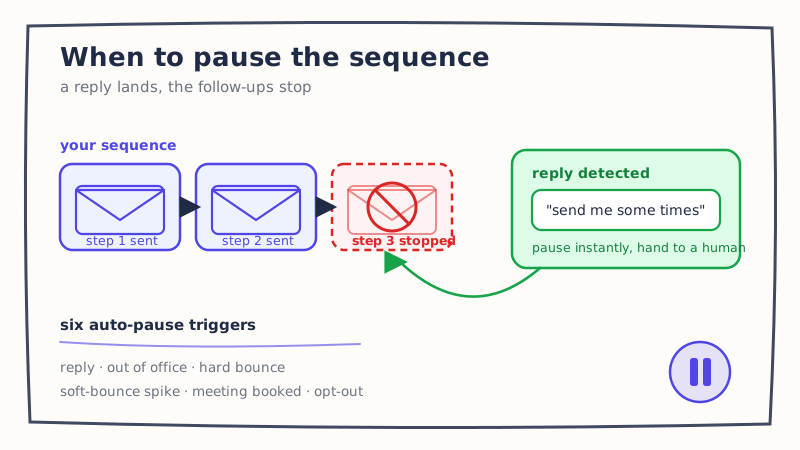
1. Reply detected: pause immediately, every time
The moment a prospect replies, every remaining step in that sequence should stop. Not the next relevant step, all of them. This is the single most important rule and the one teams most often break, usually because a reply landed in a sending inbox nobody was watching while the automation kept its schedule.
The catch is that “reply detected” has to be reliable. Simple tools pause on any inbound message to the thread, which means an out-of-office bounce or an “unsubscribe” can be misread, or a genuine reply that arrives on a forwarded thread gets missed entirely. This is where reply detection quality decides everything downstream. A system that reads the reply, understands it is a human, and pauses instantly protects the moment. One that keeps sending because it only checks for exact-match subject lines throws the lead away.
Once the sequence is paused, the clock starts on your response, not another automated step. Interest decays by the hour, so the pause should hand the thread to a fast human or an agent, not to silence. If you need a framework for what to send next, our guide on how to respond to a positive cold email reply breaks the reply types down.
2. Out of office: pause until return, then add a buffer
An out-of-office auto-responder is not a rejection and not a reply. It is a timestamp. Pausing the sequence entirely would drop a warm-enough prospect; continuing on schedule would land your follow-up in the pile they are already dreading. The right move is to pause until the stated return date, then add one to two business days before resuming, so your message arrives after the first-morning triage, not during it.
That requires parsing the return date out of the auto-reply, which most basic tools do not do. They either ignore the OOO and keep sending or pause indefinitely and forget the lead. Handling this well is a small automation with an outsized payoff, and we covered the mechanics in how AI reply agents handle out-of-office follow-ups.
3. Hard bounce: stop permanently and quarantine the address
A hard bounce means the address does not exist. There is no timing question here. Stop the sequence permanently and remove the address from active sending, because every additional attempt to a dead mailbox is a signal to mailbox providers that you are not maintaining your list. Bounces compound: a rising hard-bounce rate drags down inbox placement for the good addresses in the same campaign.
Treat the first hard bounce as final. Do not retry, do not “verify later,” and make sure the address is quarantined across every sequence it might live in, not just the one that caught the bounce.
4. Soft-bounce spike: pause the sender, not just the prospect
A single soft bounce (a full mailbox, a temporary server issue) is noise. A cluster of them from the same sending inbox is a warning that the inbox itself is in trouble. When soft bounces climb past roughly three percent across a couple hundred sends from one address, pause that sender and investigate before you burn it. This is the one trigger aimed at the sending account rather than the prospect, and it is the one most teams have no rule for at all.
Ignoring it is how a warmed-up inbox quietly slides into the spam folder while your dashboard still shows emails “delivered.” If you want the deeper mechanics of how sending behavior affects placement, we wrote about whether automated reply handling hurts deliverability.
5. Meeting booked: pause all sequences for that prospect
When a prospect books a meeting, pause every cadence touching them, not just the one that produced the booking. Prospects often sit in more than one sequence: a first-touch campaign, a re-engagement list, a nurture track. If only the winning sequence pauses, the others keep firing, and your newly booked prospect gets a cold “quick question, are you the right person?” the day before the call. Deduplicate by prospect, not by campaign.
6. Unsubscribe or opt-out: stop everywhere, immediately
An opt-out is both a courtesy and a legal line. Stop every sequence for that contact the moment the request is detected, and suppress the address so no future campaign can re-add it. The failure mode here is treating unsubscribe as a per-campaign setting rather than an account-wide suppression, which is how someone who opted out in March gets a fresh sequence in June. Detecting the intent matters too, because opt-outs rarely arrive as a clean “unsubscribe.” They arrive as “take me off your list,” “not interested, stop emailing,” or worse.
What good looks like in practice
Put together, the rules are simple to state and hard to run by hand: pause on reply instantly, pause on OOO until return plus a buffer, stop permanently on hard bounce, pause the sender on a soft-bounce spike, pause every sequence when a meeting is booked, and suppress account-wide on opt-out. The reason teams do not run all six is that each one depends on reading and understanding inbound signals in real time, across every inbox, faster than a person checking email between meetings.
That is precisely the job an automated reply layer is built for. Underfive watches the replies your sequences generate, classifies each one, and applies the right pause the moment it arrives, so a genuine reply stops the cadence and starts a human-quality response instead of the next canned step. The reply-detection and automation features are what turn these six rules from a checklist you hope someone follows into behavior that happens on every thread, every time.
Start with the one rule that pays for itself
If you do nothing else this week, verify that “pause on reply” is actually working on your live campaigns. Send a test reply to one of your own sequenced prospects and watch whether the next step still fires. Most teams discover it does. Fix that one trigger and you stop losing the warmest leads in your funnel to a follow-up that should never have sent. Then work down the list. Each rule you add makes an aggressive cadence feel like a considerate one, and considerate outbound is the only kind that still earns replies in 2026.