Your reply rate is 8%. That means 92 out of 100 prospects ignored you, but 8 actually responded. What happens to those 8 matters more than anything else in your cold outreach.
Most SDR teams have an airtight sequence for sending: A/B tested subject lines, personalized openers, timed follow-ups. Then a reply lands and the process falls apart. Someone reads it, thinks “I’ll respond later,” marks it unread, and forgets it. The meeting never happens.
A cold email reply automation workflow solves this by treating every reply as a trigger, not a to-do item.
What a Reply Automation Workflow Actually Does
The phrase “reply automation” confuses people because they assume it means auto-sending canned responses. That misses the point entirely.
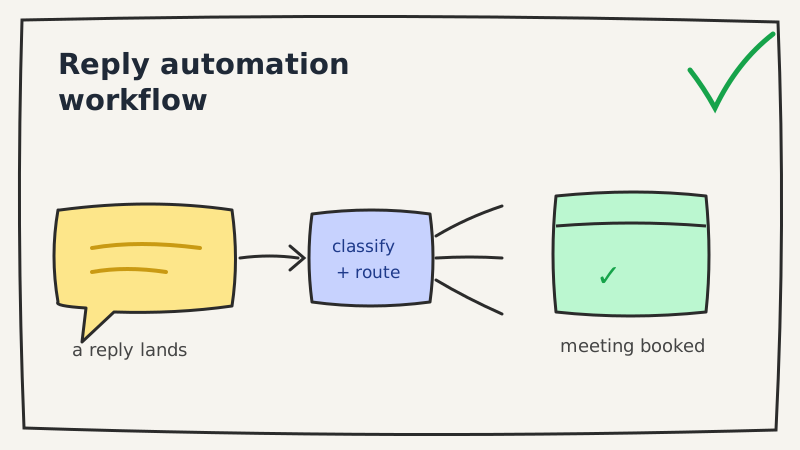
A reply automation workflow does three things:
- Classifies the reply by intent (positive, objection, out of office, unsubscribe, wrong person)
- Routes it to the right action or person immediately
- Responds or escalates within minutes, not hours
The automation handles triage and timing. Humans handle judgment and relationship. When those two are separated cleanly, reply-to-meeting conversion rates improve because you stop losing leads to process gaps.
Step 1: Map Your Reply Types Before You Build Anything
Before connecting any tools, write down every type of reply you actually receive. Most teams discover they have fewer than eight:
| Reply type | Example | Right action |
|---|---|---|
| Positive interest | ”Yes, send me some times” | Book meeting immediately |
| Soft objection | ”Not right now, try Q4” | Set reminder, reply with acknowledgment |
| Hard no | ”Not interested, remove me” | Unsubscribe, stop all sequences |
| Question | ”Does this integrate with HubSpot?” | Respond with answer, keep warm |
| Wrong person | ”I’m not the right contact, try Sarah” | Route to Sarah, update CRM |
| Out of office | Auto-reply with return date | Pause sequence, re-trigger on return date |
| Competitor mention | ”We use Outreach already” | Route to champion script |
| Ghosted then replied | Reply after 30-day silence | Treat as fresh warm lead |
This map becomes your classification logic. If you want a deeper breakdown of these buckets, see our guide to cold email reply categories and triage. Underfive uses this exact taxonomy to auto-classify incoming replies so your team only touches the ones that need human judgment.
Step 2: Set Up Classification at the Inbox Level
Classification is the most important step and the easiest to get wrong. Two approaches:
Keyword-based rules work for simple cases: if the reply contains “remove,” trigger unsubscribe. If it contains “yes” or “interested,” flag as positive. These break quickly. Prospects don’t write “yes.” They write “sure, what does the pricing look like?” which is positive with a question embedded.
Intent-based classification reads the full reply and assigns intent regardless of specific words. This is what AI reply agents do. It catches sarcasm (“oh wow that’s definitely something I need”), multi-intent replies (“not a good time, but maybe loop back in three months”), and questions disguised as objections (“we already have a tool for this, what makes yours different?”).
If you’re running more than 200 replies per week, keyword rules won’t scale. Set up intent classification first, then layer keyword rules as a fallback for obvious cases.
Step 3: Route Each Reply Type to a Defined Action
Every reply type from your map needs a corresponding action that triggers automatically. No “someone should check this,” a specific action, now.
Positive reply: pause all active sequences for that contact, notify the assigned rep via Slack or email with the full thread, start a 15-minute countdown before an automated follow-up sends if no human responds.
Soft objection: send a templated acknowledgment (not a pitch), set a CRM task for the specified date, tag the contact as “nurture.”
Hard no: mark unsubscribed in your sequencer, log in CRM, suppress from all future campaigns. Do this in under two seconds. Underfive’s integrations handle this across Instantly, Smartlead, Apollo, and others without manual CRM updates.
Out of office: extract the return date from the OOO message, pause the sequence, schedule a follow-up to trigger 24 hours after they’re back.
Wrong person: extract the referred name if present, create a new contact record, notify the rep to reach out to the new person.
The goal is zero replies sitting in an inbox with no action taken.
Step 4: Define Your Response Time SLA by Reply Type
Speed matters differently depending on the reply type. Treat them differently.
Positive replies: respond within 5 minutes. Research on lead response time consistently shows that conversion drops sharply after 15 minutes, a pattern we break down in how 5-minute response times increase conversions. A prospect who just replied to a cold email is in the highest-intent moment they’ll ever be in. That window closes fast.
Questions: respond within 1 hour during business hours. Questions signal real engagement. A day-old response reads as disorganized.
Soft objections: respond within 4 hours. These are fragile. Too fast and it feels automated. Too slow and they forget they replied.
OOO and wrong person: automate the action immediately, no human response required.
Set these as hard SLAs in your workflow. If a positive reply goes 15 minutes without rep action, the automation sends a holding response: “Thanks for getting back to me. I’m pulling up some times now and will send them over in a moment.” This keeps the conversation alive while the human catches up.
Step 5: Write Your Automated Response Templates
Automated responses only work if they sound like a human wrote them for this specific person. Templates that fail have two markers: they start with the sender’s name (“Hi [First Name]”) and they explain what they’re going to do instead of doing it.
Templates that work:
Positive interest (holding reply):
Thanks for writing back. I’m looking at open times now. Quick question, does [day of week] morning work for your calendar, or are afternoons generally better?
Question about integration:
Good question. [answer the specific integration question in 2 sentences]. Happy to walk through how it connects to your current setup on a quick call if that’s easier.
Soft objection (Q4 timeline):
That makes sense. I’ll reach back out in [month] and put a note in to connect then. In the meantime, if anything changes before that, feel free to grab time here: [calendar link].
Each template should have one job: either book the meeting or keep the thread warm for the right moment. Anything else is noise. For more copy you can adapt, see our cold email reply templates.
Step 6: Log Everything to Your CRM Without Manual Entry
The workflow falls apart if reps have to manually log what happened to each reply. By the time they get around to it, details are wrong or it doesn’t happen at all.
Connect your reply classification output directly to your CRM:
- Reply type becomes a contact property or activity log entry
- Response sent becomes a logged email
- Sequence paused becomes a status change
- Meeting booked becomes an opportunity stage update
This creates a clean audit trail. You can then report on which reply types convert to meetings, how fast reps are responding to positive replies, and which objection types are most common by persona or industry.
Step 7: Review the Workflow Weekly for the First Month
No classification system is perfect on launch. The first four weeks, review a sample of misclassified replies each week and adjust your intent rules.
Common early failures:
- OOO replies classified as positive (because they contain “I’ll be back in touch”)
- Long-winded objections classified as questions
- Positive replies with conditions classified as soft objections (“Yes, but only if it integrates with X”)
Each correction improves classification accuracy. By week four, most teams are operating at 90%+ accuracy without further tuning.
The Difference This Makes in Practice
A mid-market SaaS SDR team running 500 cold emails per week at an 8% reply rate gets 40 replies. Before this workflow: maybe 15 of those replies get a meaningful response within 24 hours, and 5 meetings get booked.
With the workflow in place: all 40 replies get classified and actioned within minutes. The 12 positive ones all get a holding reply within 5 minutes and a rep follow-up within 15 minutes. Meeting conversion from positive replies goes from 40% to 65-70% because no reply is lost to timing or inbox management.
That’s 8 meetings booked instead of 5 from the same volume of outreach.
Building This Without a Six-Month Engineering Project
Most of this workflow can be assembled from tools your team already has: your sequencing platform (Instantly, Smartlead, Apollo), a CRM (HubSpot, Salesforce), and a Slack workspace for notifications.
The missing piece is usually intent classification, the layer that reads replies and routes them correctly. That’s where Underfive fits in. It sits between your inbox and your existing tools, classifies every reply, and triggers the right action automatically. Setup takes less than a day.
The workflow itself is yours to own. The automation just makes it run without you watching it.
Next step: map your existing reply types and identify where the biggest gaps are, replies that are going unactioned, responses that are too slow, or objections that aren’t getting a follow-up. That gap analysis is where the ROI lives.