You run cold email through Apollo sequences, the sends are landing, and now replies are stacking up faster than anyone on the team can work them. You want to automate cold email replies in Apollo the same way Apollo automated the sending, but every setting you find only manages the outbound side. The inbound side, where deals actually get won, is still a human reading each message one at a time.
That gap is not a bug in Apollo. Apollo is a sequencing and prospecting engine, and it is very good at that job. The moment a prospect replies, though, Apollo hands the conversation back to you and stops. This guide walks through exactly what Apollo does with a reply, where its native handling runs out, and how to layer intent-aware reply automation on top so no warm thread sits cold.
What Apollo does with a reply (and where it stops)
Understanding Apollo’s default behavior is the whole foundation, because most people try to automate the wrong layer.
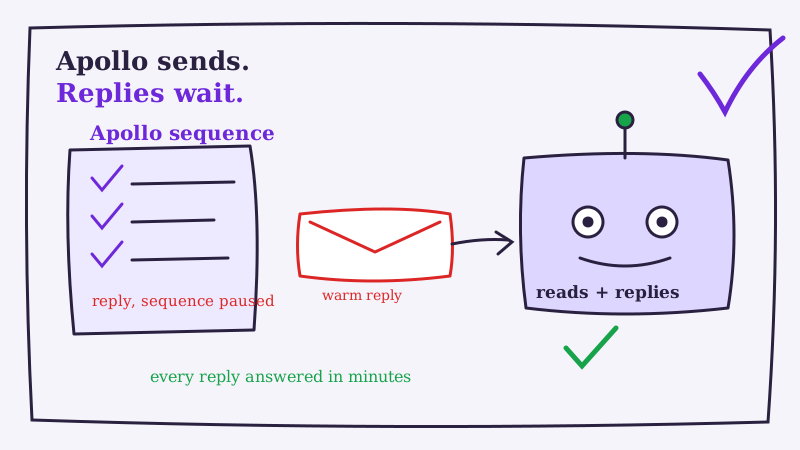
When a contact in an Apollo sequence replies, Apollo does three sensible things automatically. It detects the reply, it marks the contact as replied so the remaining sequence steps stop firing (you do not want to keep cold-pitching someone who just answered), and it drops the message into Apollo’s unified inbox where your team can see and respond to it. You can also set rules to update the contact stage or notify an owner.
Notice what is missing from that list. Apollo does not read what the reply says. It does not know whether “sounds interesting, what’s pricing?” is a buying signal and “please remove me” is an opt-out. It does not draft the correct answer for each one and send it. Apollo’s AI features help you write outbound sequence copy, but the incoming reply still waits in the inbox for a person to open it, interpret it, and type a response. The automation ends precisely where the conversation begins.
For a fuller side-by-side of what the sequencer covers versus what it leaves open, we broke it down in AI reply agent vs Apollo sequences for cold email replies.
Why Apollo’s native reply handling stalls warm threads
A unified inbox is a fine place to read replies. It is a terrible engine for answering them at outbound volume, and the reasons compound.
Speed decay. A reply is most valuable in the minutes after it arrives, while the prospect is still at their desk thinking about you. The odds of a productive conversation fall off sharply once the first hour passes. If your Apollo inbox gets checked twice a day, most warm replies are already stale by the time a rep opens them. We walked through why that window matters so much in how 5-minute response times increase conversions.
Inconsistent handling. Three reps working the same Apollo inbox will answer the same “send me more info” three different ways. One nails the value prop, one drops a bare calendar link, one never reaches the message because the queue is 50 deep. The prospect’s experience becomes a coin flip that has nothing to do with how good your product is.
No after-hours coverage. Cold outbound crosses time zones by design. A reply that hits Apollo at 10pm your time is fresh for the prospect on the other side of the world, but it will sit untouched until morning, and by then someone else may have booked the meeting you paid to source.
Sequence pause dead ends. Because Apollo stops the sequence the instant a contact replies, a prospect who says “not right now, circle back in Q2” falls out of automation entirely. If no human sets a manual reminder, that warm lead is simply gone. The pause that protects the prospect also drops them if nobody catches the handoff.
None of these are solved by writing better sequences. They are reply-side problems, and they need a reply-side tool.
How to automate cold email replies in Apollo with an AI reply agent
The fix is not to replace Apollo. It is to let Apollo keep doing sending and deliverability while an AI reply agent takes over the part Apollo was never built for: reading each incoming reply, deciding what it means, and responding in minutes.
At a high level the flow has four steps:
- Apollo detects the reply and pauses the sequence for that contact, exactly as it does now.
- The reply is routed to the AI agent through a webhook or a direct connection to the sending mailbox.
- The agent classifies and drafts a response. It recognizes whether the message is a meeting request, a pricing question, an objection, a “circle back later,” or an opt-out, then writes a calibrated reply in your voice.
- The response is sent or escalated. High-confidence replies go out on the same thread automatically. Anything ambiguous, high-value, or sensitive is flagged for a human with the full context attached.
Underfive is built for exactly this handoff. Apollo fills the top of the funnel, and the agent closes the loop on every reply the sequence surfaces, around the clock.
Step-by-step: connect an AI reply agent to Apollo
There are two reliable ways to wire this up. Pick the one that fits how technical you want to get.
Option A: Webhook-based connection
This gives the agent the cleanest signal and the fastest reaction time.
Step 1. Enable a reply webhook in Apollo. In your Apollo workspace, open the integrations settings and create a webhook that fires on the reply-received event. Apollo sends a payload containing the prospect’s message, the thread context, and the sequence and contact metadata.
Step 2. Point the webhook at the agent’s intake endpoint. Your AI reply agent provides a URL that accepts inbound reply data. Paste it into the Apollo webhook configuration. Most agents accept the standard JSON Apollo sends, so you rarely need a custom transform.
Step 3. Map the fields. Confirm the prospect email, message body, and thread identifier line up between Apollo’s payload and what the agent expects. This mapping is what lets the agent reply on the existing thread instead of opening a new one that breaks continuity.
Step 4. Authorize the sending mailbox. The agent needs permission to send from the same mailbox Apollo used, so the reply arrives from the address the prospect already recognizes. Connect that mailbox to the agent.
Option B: Connected-mailbox route
If you would rather not touch webhooks, connect the agent directly to the mailboxes Apollo sends from.
Step 1. Connect each sending mailbox to the agent so it can see and send on the same inboxes in your Apollo rotation.
Step 2. Scope the agent to campaign replies by matching the sequences Apollo is running, so it acts only on cold outbound threads and ignores unrelated mail.
Step 3. Leave Apollo’s sequence-pause on and skip any manual canned replies for those sequences, so Apollo and the agent are never both answering the same message.
Either route ends the same way: a reply hits your Apollo inbox and the agent picks it up automatically. The Underfive features page covers how the reply detection, drafting, and sending pieces fit together, and setup guidance for this specific stack lives at underfive.ai/integrations/apollo.
Configure Apollo reply logic, escalation, and brand voice
Connecting the pipes is the easy part. The value is in how you set the agent’s judgment.
Define your intent categories. At minimum, teach the agent to recognize meeting requests, pricing questions, “send me more info,” objections, “circle back later,” out-of-office bounces, and clear opt-outs. Each one should map to a distinct response strategy, not a single generic template. The “circle back later” category matters especially here, because it is the exact case Apollo’s sequence pause would otherwise drop.
Set escalation thresholds. Decide which situations hand off to a human: enterprise accounts above a deal-size line, legal or security questions, and any reply the agent classifies with low confidence. Everything else runs autonomously. A good agent hands you fewer messages over time as it learns your edge cases.
Calibrate brand voice. Feed the agent examples of how your sharpest rep writes. The bar is replies that read like a helpful human teammate. If a prospect ever has to wonder whether they are talking to software, keep tuning.
Protect deliverability. Timely, human-sounding replies sent from your real Apollo mailbox read as normal conversation to inbox providers, which is good for the domain reputation your sequences depend on. We covered why reply quality and deliverability move together in do AI reply agents hurt email deliverability.
Measure what the Apollo reply automation actually changes
Do not flip this on across a live account and walk away. Roll it out in stages and watch three numbers.
Start in draft mode if the agent supports it: let it generate responses without sending for a few days and review each one for classification accuracy and tone. Then graduate to auto-send on the safe categories first, such as scheduling links for meeting requests and out-of-office handling, while keeping objections and high-value replies in review a little longer.
The metrics that tell you whether it is working:
- Median reply time. It should fall from hours to minutes. This is the single clearest signal.
- Reply-to-meeting conversion. Faster, more consistent answers should lift the share of replies that turn into booked calls.
- Percent of replies handled without human touch. As this climbs, your team’s time shifts from triage to the conversations that genuinely need a person.
A team manually working an Apollo inbox often answers a fraction of replies within a day. The same team with an agent in place answers nearly all of them within minutes, and that speed difference is where the extra meetings come from.
Bringing it together
Apollo gets your message in front of thousands of the right prospects and correctly steps back when one replies. The problem is that stepping back leaves every warm thread waiting on a human who is already behind. Layer an AI reply agent on top and you keep everything Apollo does well while closing the one loop it was never designed to close.
The setup is straightforward: route Apollo replies to the agent through a webhook or a connected mailbox, define your intent categories and escalation rules, calibrate the voice, and roll it out in stages. If reply handling is the bottleneck in your Apollo motion, see how Underfive plugs into your existing sequences and turns every reply into a fast, on-brand next step. Start by listing the five replies your team retypes most this week: those are the ones worth automating first.