Stop Losing Deals: How to Automate Cold Email Replies Before Prospects Go Cold
There’s a moment that every SDR knows but nobody talks about.
You sent a cold email three days ago. It was good — genuinely good. Personalized opener, tight value prop, a clear ask. And this morning you woke up to a reply: “Sounds interesting, what does pricing look like?”
Except you were in back-to-back demos all day. Then there was a team standup. Then a fire with an existing customer. By the time you sit down to reply, it’s 6:47pm and that prospect has already been pitched by two competitors who got back to them inside the hour.
The deal isn’t dead because of your email. It’s dead because of the gap between their interest and your response.
This is the core problem that cold email reply automation solves — and in 2026, it’s no longer a nice-to-have. It’s the difference between a pipeline that grows and one that quietly bleeds out.
Why Response Time Is Your #1 Conversion Variable
The data on this is not subtle. Studies consistently show that leads contacted within 5 minutes of showing interest are 21x more likely to convert than those contacted after 30 minutes. In cold email, where you’ve already fought through spam filters, subject line skepticism, and a crowded inbox just to earn a reply — letting that reply sit unanswered for hours is a critical unforced error.
And the problem scales with success. When your outreach volume is 50 emails a day, manual replies are manageable. But when you’re running sequences across multiple inboxes, targeting different verticals, and generating 40–80 replies a week, a human SDR simply cannot keep up with the volume and maintain response quality at the same time.
Something has to give — and right now, at most companies, it’s speed.
What Cold Email Reply Automation Actually Does
Let’s be precise, because this matters. Cold email reply automation doesn’t mean sending templated canned responses to everyone who replies. That’s the old model — and it’s why so many sales teams got burned by early “autoresponder” tools that made prospects feel processed rather than heard.
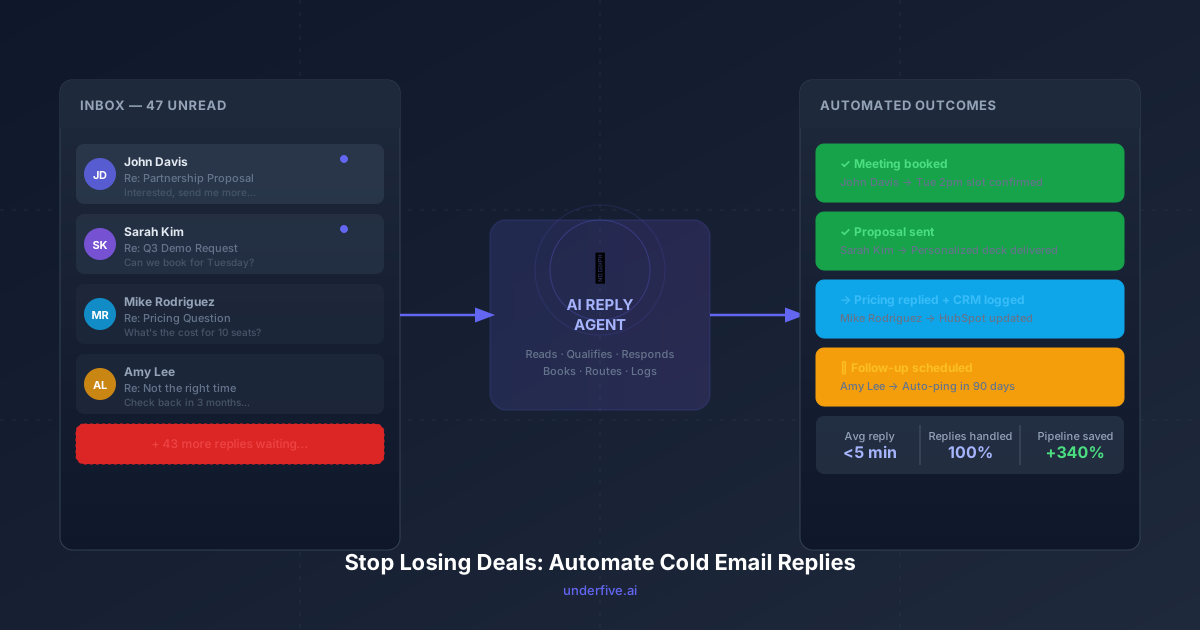
Modern AI reply automation, like what Underfive provides, reads the actual content of the reply, classifies intent, and responds appropriately for each scenario:
- Interest signals (“Tell me more”, “What does pricing look like?”) → Gets a warm, personalized response with relevant details, and a calendar link.
- Objections (“We’re locked into a contract”, “Budget is frozen”) → Acknowledged gracefully, with a follow-up sequence triggered for the right time.
- Referrals (“You should talk to our VP of Sales”) → Captured, routed, and a separate thread opened with the new contact.
- Not right now replies → Logged, and a future touchpoint scheduled automatically — so no lead falls through the cracks.
- Unsubscribes → Handled compliantly and immediately, with no human needed.
The key is that the AI isn’t just sending a pre-written reply. It’s reading context, maintaining conversation continuity, and making decisions — the same decisions a good SDR would make, but at machine speed and without the capacity ceiling.
The Four Reply Types That Kill Most Sales Pipelines
If you look at where deals actually die in the cold email channel, it almost always traces back to one of four failure modes:
1. The Ignored Interest Reply
A prospect replies with genuine curiosity — “This looks relevant, can you share more details?” — and the SDR doesn’t see it until the next day. By then, the prospect has moved on, or worse, has already booked a demo with a faster competitor. This is the most common pipeline leak, and it’s almost entirely preventable with automation.
2. The Mishandled Objection
Pricing objections, competitor comparisons, and “we’re not ready yet” replies require nuance. A clumsy or rushed human response often confirms the objection rather than reframing it. An AI trained on your specific objection-handling playbook will consistently apply your best response every time — no off days, no misread tone.
3. The Lost Referral
“You should really talk to [Name] — they handle vendor decisions” is gold. But only if someone captures it, acts on it immediately, and creates a warm thread with the new contact. In a high-volume SDR environment, referral replies routinely get buried or forgotten. Automation routes them without exception.
4. The Stale Follow-Up
“Check back with me in Q4” is a reply that requires a scheduled follow-up, not a “sounds great, talk soon!” and nothing in the calendar. Without a system that automatically logs this and creates a future trigger, Q4 never happens. The prospect forgets you. You forget them. The deal never existed.
Setting Up AI Reply Automation: What to Expect
If you’re evaluating whether to implement a tool like Underfive, here’s a realistic picture of the setup process and what you get out of it.
Week 1: Training and Integration Most platforms connect to your existing cold email tool — whether that’s Instantly, Smartlead, Apollo, or a custom inbox setup — and pull in your active sequences. You’ll configure your brand voice, set escalation rules (which replies should always go to a human), and map your objection responses.
Week 2: Supervised Runs The AI starts handling replies, but you review every response before it sends. This phase is where you tune the output — adjusting tone, adding context-specific language, refining how it handles edge cases. Most teams run this phase for 5–10 business days.
Week 3+: Autonomous Operation With confidence thresholds set, the AI operates independently on the reply categories you’ve approved. Escalation rules ensure that anything outside those categories — large enterprise deals, unusual compliance questions, angry replies — surfaces to a human with full context included.
The net effect, typically within 30 days: response times drop from hours to under 5 minutes. Reply-to-meeting conversion rates increase by 20–40%. And your SDRs spend their time on the conversations that actually require a human — strategic deals, late-stage negotiations, relationship building.
What Automation Doesn’t Replace (And Shouldn’t)
This is worth saying clearly: AI reply automation is not a substitute for good outreach.
If your initial cold emails are poorly personalized, lack a clear value proposition, or are targeting the wrong audience, automation will just help you fail faster. The reply agent needs replies to work with — and great replies come from great outreach.
What automation does is remove the constraint that has historically made scale the enemy of quality. Before, you could either send high volume with slow follow-up, or send low volume with fast personal responses. Now the tradeoff disappears. You can run high-volume outreach and still respond to every interested prospect in minutes, with a reply that actually addresses what they asked.
That’s not a marginal improvement. For most sales teams, it’s a structural shift in how the pipeline works.
The Cost of Not Automating
Here’s the calculation most teams haven’t done explicitly:
If your cold email program generates 60 interested replies per week, and your average deal size is $8,000, and slow response time costs you even 15% of those opportunities — that’s 9 deals a week. $72,000 in weekly pipeline lost not because of bad prospecting or weak messaging, but because no one replied fast enough.
Over a quarter, that’s a lot of revenue to leave on the table for the sake of keeping the inbox manual.
The prospects who reply to your cold emails are not passive. They’re comparison shopping. They’re evaluating three other vendors simultaneously. The first vendor to respond with a clear, relevant, human-feeling answer wins a disproportionate share of the meetings — and the deals.
Underfive is built specifically for this problem: AI that reads your cold email replies, understands intent, and responds in your voice — fast enough to matter, smart enough to sound like you at your best.
If your reply inbox is growing faster than your team can handle it, that’s not a headcount problem. It’s an automation opportunity.
Want to see how AI reply automation works with your existing cold email setup? Try Underfive free — no sequences to rebuild, no workflow overhaul required.