How to Measure AI Reply Agent ROI: Metrics That Actually Matter
Picture this: your sales team ran a cold email campaign last quarter. 12,000 emails sent. 6% reply rate — 720 replies. Solid numbers on paper. But when you look at the actual pipeline, almost nothing closed. What went wrong?
Dig into the data and you find that 340 of those replies were objections, questions, or “not interested” responses that sat in rep inboxes for 48 hours before anyone touched them. By the time a rep responded, the window had closed. Another 180 were positive replies that got buried in the queue and never got a follow-up at all.
The campaign wasn’t the problem. The reply management was.
AI reply agents exist to solve exactly this. They handle the volume, speed, and consistency that human reps can’t maintain at scale. But once you deploy one, how do you know if it’s actually working? Most sales leaders default to the same metrics they’ve always tracked — and those metrics will lie to you.
Why Traditional Metrics Miss the Point
Open rate and reply rate measure what happens before the conversation starts. They’re useful for benchmarking your outreach creative and deliverability (making sure your list is clean with a tool like Scrubby is table stakes here). But they tell you nothing about what happens after someone replies.
Here’s the trap most teams fall into:
Vanity metric thinking: “We got a 7% reply rate, that’s great!” Maybe. But if your AI agent is misclassifying intent, responding to objections with pitch content, or failing to route hot leads to reps fast enough — that 7% reply rate is producing zero pipeline.
Input vs. output confusion: Reply rate is an input to your revenue process. Revenue is the output. An AI reply agent lives in the middle of that chain, and that’s where you need to measure it.
Comparing against the wrong baseline: Evaluating an AI agent’s performance against “how many replies we got” ignores the obvious counterfactual — how many of those replies would have converted without the agent?
The five metrics below measure what actually matters: what your AI reply agent does with the replies it receives.
The 5 Metrics That Actually Matter
1. Time-to-First-Response (T2FR)
What it measures: The median time between a prospect sending a reply and receiving the first response — whether from the AI or a routed rep.
Why it matters: Speed is the single biggest variable in lead conversion. Studies consistently show that leads contacted within 5 minutes convert at dramatically higher rates than those contacted within an hour. For cold email replies, this effect is even more pronounced — someone who just replied to your email is in a window of active consideration that closes fast.
How to measure it: Pull reply timestamps from your email sending platform. Pull response timestamps from your AI agent or CRM. Calculate the median gap. Segment by reply type (positive, objection, question, out-of-office) to see if certain categories are getting slower handling.
Benchmarks:
- Best-in-class with AI: Under 5 minutes for positive replies, under 2 minutes for objection handling
- Industry average (human reps): 4-8 hours
- Red flag: Anything over 1 hour for a positive reply signal
If your AI agent isn’t responding to positive replies within minutes, something is misconfigured. Either intent classification is off, or routing rules are too conservative.
2. Positive Reply Conversion Rate (PRCR)
What it measures: The percentage of positively-classified replies (interest expressed, questions asked, pricing inquiries) that advance to the next stage — typically a scheduled call or meeting request.
Why it matters: This is your AI agent’s core job: take a warm signal and turn it into a conversation. A high reply rate with a low PRCR means your agent is engaging but not advancing.
How to measure it: Define “positive reply” clearly in your system — this usually means any reply that isn’t an unsubscribe, hard no, or auto-responder. Tag them in your CRM. Track how many progress to meeting-requested status within 72 hours.
Formula: (Positive replies that advance to meeting request) ÷ (Total positive replies) × 100
Benchmarks:
- Strong AI agent performance: 35-50% PRCR
- Average: 20-30%
- Red flag: Under 15% (suggests your agent is failing to handle objections or move conversations forward)
3. Meeting-Booked Rate from Replies (MBR)
What it measures: The percentage of all replies (not just positive ones) that result in a booked meeting.
Why it matters: This is the metric that ties directly to pipeline. Meetings are the gateway to revenue for most B2B sales processes. If your AI agent is working well, it should be converting a meaningful percentage of total reply volume into calendar events.
How to measure it: Track booked meetings that originate from reply conversations. Most CRMs let you tag meeting source — use it. If you’re using a platform like Kali for your cold outreach sequences, calendar booking data is typically available natively.
Formula: (Meetings booked from reply conversations) ÷ (Total replies received) × 100
Benchmarks:
- Strong AI agent performance: 8-15% of all replies convert to a booked meeting
- Average: 4-8%
- Red flag: Under 3% (suggests high positive reply rate that isn’t converting, or poor handling of the middle-funnel conversation)
This metric differs from PRCR because it captures the full funnel, including conversions from replies initially classified as objections or questions that the agent successfully turned around.
4. Cost Per Booked Meeting (CPBM)
What it measures: The total cost of your reply management operation divided by the number of meetings booked through it.
Why it matters: This is the ROI metric that every sales leader should be tracking. It makes the cost of your AI agent directly comparable to alternatives — hiring another SDR, outsourcing reply management, or having AEs handle their own replies.
How to calculate it:
Total cost = AI agent subscription + rep time spent on escalations + any platform or integration costs
CPBM = Total cost ÷ Meetings booked in the same period
Example:
- AI agent: $2,000/month
- Rep escalation handling: 10 hours/month at $75/hour loaded cost = $750
- Total: $2,750/month
- Meetings booked from replies: 85
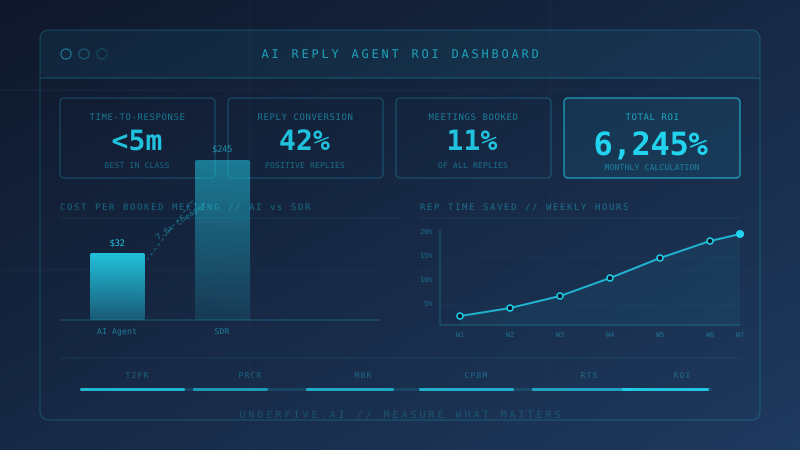
- CPBM: $32.35
Compare that to the alternative. An experienced SDR costs $5,000-7,000/month fully loaded and books 20-35 meetings per month from outbound. CPBM of $143-350.
Benchmarks:
- Strong AI-driven CPBM: $20-50
- Average: $50-100
- SDR-managed baseline: $150-350
If your CPBM is higher than your SDR-managed baseline, your AI agent isn’t earning its place.
5. Rep Time Saved (RTS)
What it measures: The number of hours per week your reps recover by not handling routine reply management manually.
Why it matters: CPBM captures efficiency in terms of meetings. RTS captures efficiency in terms of capacity. Time freed from reply triage and follow-up is time reps can reinvest in high-value activities — discovery calls, demos, negotiation, expansion.
How to measure it: Survey reps before deployment to baseline their weekly reply management time. Then re-survey 30 days post-deployment. The delta is your RTS figure.
Alternatively, log escalation volume. If your AI agent is handling 90% of replies without human intervention and you were previously spending 3 hours/day on reply management, RTS = 2.7 hours/day.
Benchmarks:
- Strong AI agent performance: 80-90% of replies handled without rep involvement
- Average: 60-75%
- Red flag: Under 50% (the agent isn’t shouldering enough of the load to justify its cost)
Multiply RTS by rep loaded cost to get a dollar figure. A rep recovering 15 hours per week at $75/hour loaded cost is $1,125/week in recaptured capacity — $54,000 annualized per rep.
How to Calculate Overall ROI
Pull these five metrics together into a single ROI calculation:
Step 1: Quantify the revenue impact
(Meetings booked via AI agent per month) × (Close rate from meetings) × (Average deal value) = Revenue attributable to AI reply management
Step 2: Quantify the cost savings
(Rep time saved per month in hours) × (Fully loaded hourly rep cost) = Operational savings
Step 3: Sum your returns
Total return = Revenue impact + Operational savings
Step 4: Calculate ROI
ROI = ((Total return - AI agent cost) ÷ AI agent cost) × 100
Example with real numbers:
- 85 meetings booked/month via AI agent
- 25% close rate from meetings
- $8,000 average deal value
- Revenue impact: 85 × 25% × $8,000 = $170,000
- Rep time saved: 60 hours/month × $75/hour = $4,500
- Total return: $174,500
- AI agent cost: $2,750/month
- ROI: 6,245%
Even with conservative numbers, the math is compelling. The real question isn’t whether AI reply agents generate positive ROI — they do, almost universally. The question is whether your implementation is capturing the available return.
Building Your Measurement Stack
Tracking these five metrics requires connecting a few data sources that often don’t talk to each other by default:
Email platform data: Reply timestamps, sender, content classification. Your sending platform should have API access or webhook exports.
AI agent logs: Intent classification decisions, response timestamps, escalation triggers. Any reputable AI reply agent should surface this in a dashboard or export.
CRM data: Meeting booked status, opportunity stage, close/loss outcomes. This is where you connect reply conversations to revenue outcomes.
Calendar/scheduling tool: Meeting confirmation timestamps and no-show rates. If you’re tracking MBR, you want to count confirmed meetings that actually happen, not just invites sent.
Once these sources are connected, set a weekly review rhythm. T2FR and PRCR move fast — weekly data is meaningful. CPBM and RTS are better evaluated monthly, where volume smooths out variance.
Common Measurement Mistakes
Only measuring averages: T2FR averages can mask a bimodal distribution — fast responses for one segment, slow for another. Always look at percentiles (median, 90th percentile) to spot where the bottlenecks are.
Not segmenting by campaign: An AI agent performing well on one campaign type may underperform on another. If you’re running different sequences — say, new prospect outreach versus competitor displacement (competitor intelligence from a tool like CAM can sharpen these) — measure each separately.
Ignoring negative conversion: Track the rate at which your agent turns initial negative replies into positive outcomes. This is the highest-value thing a good AI reply agent does, and most teams don’t measure it at all.
Measuring too early: AI reply agents learn and improve. Your week-one metrics will be worse than week-eight metrics. Give any new deployment 30-45 days before drawing conclusions from CPBM or PRCR.
The Benchmark Summary
| Metric | Red Flag | Average | Strong |
|---|---|---|---|
| Time-to-First-Response | >1 hour | 30-60 min | <5 min |
| Positive Reply Conversion Rate | <15% | 20-30% | 35-50% |
| Meeting-Booked Rate from Replies | <3% | 4-8% | 8-15% |
| Cost Per Booked Meeting | >$150 | $50-100 | $20-50 |
| % Replies Handled Without Reps | <50% | 60-75% | 80-90% |
What to Do With This Data
If your T2FR is high: Check your intent classification thresholds. An agent configured to escalate everything is an expensive router, not a reply manager.
If your PRCR is low: Audit your agent’s actual replies. Are they addressing objections directly? Are they giving prospects a clear next step? Vague AI responses kill conversion.
If your CPBM is too high: Either your agent is handling too few replies autonomously (low RTS), or your meeting close rate from AI-assisted conversations is lower than expected. Investigate both.
If your RTS is low: Your escalation rules are too aggressive. Most “objections” can be handled without a rep. Tighten the criteria for human handoff.
The goal isn’t to minimize rep involvement for its own sake. It’s to ensure every reply that needs a human gets one immediately, and every reply that doesn’t never wastes a human’s time.
That’s the measurement framework that tells you whether your AI reply agent is actually earning its place in your stack.